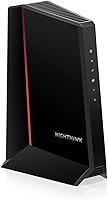
NETGEAR Nighthawk CM3000 Review: Worth It? (October 2026)
This NETGEAR CM3000 review finds a good fit for cable customers whose provider approves the modem and who want a separate router with a 2.5 Gig connection. Check the approved plan speed and mid-split availability before buying.

On this page (10 sections)
- What does this NETGEAR CM3000 review recommend?
- Who should buy the CM3000, and who should skip it?
- Which speeds and connections can the CM3000 use?
- Which providers support the CM3000?
- How does the CM3000 compare with the CM2500, CM2000 and S34?
- What should you check before ordering the CM3000?
- How do you set up and care for the CM3000?
- What mistakes should CM3000 buyers avoid?
- Which modem should you choose?
- How did the NETGEAR CM3000 earn its score?
This NETGEAR CM3000 review finds a sensible choice for cable users with provider approval, a compatible plan and a separate router. The modem has a 2.5 Gig Ethernet port, but that port alone cannot guarantee a matching internet speed.
The key buying check is the exact service tier your provider supports at your address. NETGEAR describes the CM3000 for plans up to 2.5 Gbps download and 1 Gbps upload.
Its provider guidance says plans up to 2 Gbps, so confirm both plan eligibility and mid-split availability before you order.
What does this NETGEAR CM3000 review recommend?
The CM3000 is best for a cable customer who wants a standalone modem and has a router that can use a 2.5 Gig connection. Skip it if you need built-in Wi-Fi, bundled voice support, or a provider-approved modem for fiber, DSL or satellite service.
NETGEAR Nighthawk CM3000: Best for multi gig routers
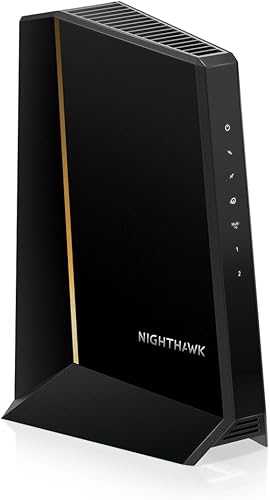
- DOCSIS 3.1
- 2.5 Gig Ethernet port
- Two additional 1 Gig ports
A modem-only option with a 2.5 Gig port for a compatible router and two 1 Gig ports that can be combined on a compatible router. Check plan and provider support.
Pros
- 2.5 Gig port for a compatible router
- Two 1 Gig ports support link aggregation up to 2 Gbps
- Nighthawk app offers guided setup and status tools
Cons
- No built-in Wi-Fi
- Actual speeds and mid-split support depend on provider and plan
This is a modem, not a complete home network. You need a separate Wi-Fi router or mesh system, and your router must have a suitable WAN port to use the modem's multi-gig link.
Two additional 1 Gig ports provide another option: a compatible router can combine them through link aggregation for up to 2 Gbps. Check your router's documentation before buying the CM3000 specifically for that arrangement.
Who should buy the CM3000, and who should skip it?
Buy the CM3000 if your provider approves it for your plan, you want to choose or keep your own router, and your network can make use of a multi-gig connection. It can also suit a home planning to upgrade its router later, since the modem and Wi-Fi hardware stay separate.
Skip it if your provider won't approve the model, you have a bundled voice plan, or you want one device to handle both modem and Wi-Fi duties. NETGEAR identifies the CM3000 as a US cable modem and excludes bundled voice plans.
For more options with multi-gig connections, compare our best multi-gig cable modems. If you prefer an all-in-one device, see our guide to cable modem router combos.
Which speeds and connections can the CM3000 use?
The CM3000 offers a 2.5 Gig Ethernet port for a compatible router, but your provider's approved plan sets the internet speed you can receive. Its two 1 Gig ports can be combined for up to 2 Gbps only when the connected router supports link aggregation.
This distinction helps prevent a common buying mistake: treating Ethernet port speed as the speed of the internet plan. The modem's port, the provider's service tier, the network available at your address, and the router all need to line up.
NETGEAR describes the CM3000 as a high-split DOCSIS 3.1 modem and says actual speeds vary by plan and provider. Ask whether mid-split or high-split service is available to you, especially if faster uploads are a reason for upgrading.
A 2.5 Gig port may still give you room to change routers later, but it won't make a slower plan faster. Your connected router and devices also need compatible Ethernet connections to benefit from a multi-gig link.
Our guide to DOCSIS 3.1 cable modems explains how to compare this modem type, while our gigabit modem guide helps match equipment to a plan target.
Which providers support the CM3000?
NETGEAR names Xfinity, Spectrum and Cox among compatible providers, along with most US cable providers. Support depends on the provider's current approval list, your location and your plan, so confirm the model number and speed tier directly.
Before buying, also ask whether your account includes home phone service. NETGEAR says the CM3000 isn't compatible with bundled voice plans, which can rule it out even when the internet service itself is compatible.
- Xfinity customers can check our Xfinity compatible modem guide.
- Spectrum customers can compare options in our Spectrum approved modem guide.
- Cox customers can review the Cox approved modem list.
If the provider doesn't approve the CM3000 for your plan, choose a model it does approve. Support for one plan or area doesn't guarantee support for another.
How does the CM3000 compare with the CM2500, CM2000 and S34?
Choose among these four modems based on provider approval and the Ethernet ports your router can use. The CM3000 offers the most varied port arrangement here, while the CM2500 focuses on two Gigabit ports and the CM2000 uses one 2.5 Gig port.
| Model | Ethernet ports | Stated plan support | Wi-Fi |
|---|---|---|---|
| NETGEAR Nighthawk CM3000 | One 2.5 Gig, two 1 Gig | Up to 2.5 Gbps download; provider guidance up to 2 Gbps | Separate router required |
| NETGEAR Nighthawk CM2500 | Two Gigabit | Up to 2 Gbps download | Separate router or mesh required |
| NETGEAR Nighthawk CM2000 | One 2.5 Gig | Cable plans up to 2.5 Gbps | Separate router required |
| ARRIS Surfboard S34 | One 2.5 Gig, one 1 Gig | Up to 2.5 Gbps | Separate router or mesh required |
The CM2500 suits someone whose plan and router can use two Gigabit ports, including link aggregation up to 2 Gbps on a compatible router. It also has guided setup and modem status tools in the Nighthawk app.
The CM2000 is a simpler option if one 2.5 Gig connection is enough. The ARRIS S34 has a second 1 Gig port and is qualified for Cox, Xfinity and Spectrum.
Confirm each model's approval for your own plan before choosing.
What should you check before ordering the CM3000?
Check provider approval, plan speed and router compatibility before buying. These three details tell you whether the CM3000's capabilities will be useful in your home.
- Ask your provider whether it supports the CM3000 at your address and for your chosen plan.
- Confirm available mid-split or high-split service if upload speed matters.
- Check that your router has a suitable WAN port, or supports link aggregation if you intend to combine the two 1 Gig ports.
- Make sure your service is cable internet and doesn't include a voice bundle that needs modem support.
- Include a separate Wi-Fi router or mesh system in your setup plan.
If your current service is around gigabit speed, consider whether the extra ports and multi-gig capability solve a real need. Our cable modem buying guide covers provider checks, plan matching and the features to compare.
How do you set up and care for the CM3000?
Connect the coax cable and power, activate the modem with your provider, then connect a separate router for Wi-Fi. NETGEAR's Nighthawk app offers guided setup and status tools, and you can also use a web browser.
A straightforward setup order helps isolate connection problems:
- Place the modem near the coax outlet and router, with room around it for cables and airflow.
- Connect the coax cable and power adapter.
- Follow your provider's activation process and wait for it to confirm the modem is online.
- Connect the router to the modem using the Ethernet port that matches your intended setup.
- Check the modem status and then confirm that the router has internet access.
Keep the modem's vents clear and avoid pinching or sharply bending the coax and Ethernet cables. If the modem doesn't come online, check the cable connections and activation status with your provider before changing router settings.
Don't assume a Wi-Fi problem means the modem itself has failed. First check whether the modem is online, then troubleshoot the router and wireless network separately; our modem connection troubleshooting guide walks through common checks.
What mistakes should CM3000 buyers avoid?
The most common mistake is buying for a port's headline speed before checking provider approval and plan eligibility. A compatible router matters too, and the modem doesn't provide Wi-Fi on its own.
Avoid these planning errors:
- Assuming every cable plan from a named provider supports the CM3000.
- Expecting the 2.5 Gig port to raise the plan's speed.
- Buying it for bundled voice service without confirming compatibility.
- Planning to combine the two 1 Gig ports without a router that supports link aggregation.
- Troubleshooting Wi-Fi before confirming that the modem has activated and is online.
Checking these details first can prevent a mismatch between the modem, service and router.
Which modem should you choose?
Choose the CM3000 if your provider approves it, you want a separate router and your network can use its 2.5 Gig port or link aggregation. Choose the CM2500 if two Gigabit ports suit your plan, the CM2000 if you need one 2.5 Gig link, or the S34 if its provider qualification and extra 1 Gig port fit your needs.
For more models from the same brand, compare our best NETGEAR Nighthawk modems. The right pick is the one your provider approves and your router can use, not simply the model with the largest port number.
How did the NETGEAR CM3000 earn its score?
The CM3000 earns an 8.3 for its mix of a 2.5 Gig connection, two additional Gigabit ports and separate-router flexibility. Provider plan limits, voice incompatibility and the need to supply Wi-Fi keep it from being the right fit for every cable home.
Frequently asked questions
Is the NETGEAR Nighthawk CM3000 a modem router combo?
No. The CM3000 is a standalone cable modem with no built-in Wi-Fi.
You need a separate Wi-Fi router or mesh system for wireless coverage, then connect it to the modem and follow your provider's activation steps.
Which internet providers work with the CM3000?
NETGEAR names Xfinity, Spectrum, Cox and most US cable providers, but approval depends on your location and plan. Confirm the exact CM3000 model and speed tier with your provider before buying; it isn't compatible with Verizon, AT&T, CenturyLink, satellite services or bundled voice plans.
Can the CM3000 deliver 2.5 Gbps internet?
The CM3000 has a 2.5 Gig Ethernet port and is described for cable download plans up to 2.5 Gbps, while NETGEAR's provider guidance says plans up to 2 Gbps. Ask your provider which tier it approves for this model; the plan, network and router affect the speed you receive.
How do you set up a CM3000?
Connect the coax cable and power, then activate the modem with your provider. NETGEAR's Nighthawk app offers guided setup and status tools, and setup is also available through a web browser.
Connect a separate router for Wi-Fi after activation.