Xfinity Compatible Modems: Which Models Qualify?
Xfinity compatible modems must be approved for your plan and service address. Check the exact model with Xfinity before buying, then confirm whether you need a separate router or voice service.
On this page (7 sections)
- How do you check whether a modem is Xfinity compatible?
- Which Xfinity compatible modems are worth checking?
- Does your Xfinity plan speed affect modem approval?
- Do Xfinity compatible modems include Wi-Fi?
- Can you use an Xfinity compatible modem with home phone service?
- What should you do after choosing an approved modem?
- Which Xfinity compatible modem should you choose?
Xfinity compatible modems must be approved for your plan and service address. Check the exact model with Xfinity before you buy, then confirm whether you need a separate router or support for Xfinity Voice.
The four DOCSIS 3.1 modems below are candidates to compare, not a guarantee of approval for every Xfinity customer. Xfinity can change its approved device list, so use its compatibility tool as the final check.
How do you check whether a modem is Xfinity compatible?
Search the exact model number in Xfinity's device compatibility tool and enter your service address and plan details. Then check the approved speed tier and any service limits shown for that modem.
Start with the model number, not just the brand. For example, search “SB8200” or “CM2500,” and make sure the result matches the specific modem you plan to buy.
Xfinity's device compatibility page is the place to confirm current approval. If your plan or address changes, check again before switching equipment.
Compatibility can have several parts:
- Provider: The modem must be supported by Xfinity.
- Plan: Its approved tier should cover your subscribed speed.
- Address: Available service and equipment support may vary by location.
- Features: Voice service and other bundled options may need a specific device.
- Network setup: A modem-only unit needs a separate Wi-Fi router for wireless devices.
For a broader overview of what to compare, see our cable modem buying guide. It covers plan speed, DOCSIS versions, ports, and whether a combo device makes sense.
Which Xfinity compatible modems are worth checking?
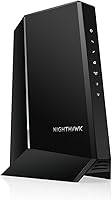
The ARRIS Surfboard SB8200, ARRIS Surfboard S34, NETGEAR Nighthawk CM2500, and Motorola MB8611 are four DOCSIS 3.1 options to check with Xfinity. Each is a modem-only device, so plan for a separate router if you need Wi-Fi.
The SB8200 has two 1 Gigabit Ethernet ports and supports cable plans up to 2 Gbps. Confirm the specific plan approval and whether its port setup fits the speed you subscribe to.
The S34 has a 2.5 Gigabit port and a second 1 Gigabit port. ARRIS describes it for plans up to 2.5 Gbps; Xfinity plan approval still needs to be checked for your address.
NETGEAR describes the CM2500 for Xfinity internet plans up to 2 Gbps and says ISP activation is required. It isn't compatible with bundled voice plans, so check that limit if you use Xfinity Voice.
Motorola describes the MB8611 as a DOCSIS 3.1 modem with a 2.5 Gigabit Ethernet port. Check Xfinity's device tool for the exact model and plan tier before choosing it.
Does your Xfinity plan speed affect modem approval?
Yes, the plan speed matters because Xfinity approval and modem capabilities can vary by tier. Choose a device that Xfinity approves for your subscribed speed, not just one with a high speed number in its name.
The modem's Ethernet port can also affect the wired speed you can use with a router or computer. A 1 Gigabit port, for instance, has a different connection ceiling than a 2.5 Gigabit port, though your service plan and network setup also matter.
If you have gigabit service or expect to upgrade, compare the modem's approved tier and port type before buying. Our guide to modems for gigabit internet explains the main speed and connection details to check.
A faster modem won't raise the speed included in your plan. Ask Xfinity whether the plan is available at your address and which customer-owned models it approves for that tier.
What should you check for DOCSIS 3.1?
DOCSIS 3.1 is a useful starting point for many current cable plans, but it does not replace checking Xfinity's model list. Verify both the technology and the exact device approval.
The four options here use DOCSIS 3.1. Their Ethernet ports and stated plan ceilings differ, so compare those details with your intended plan and router.
For a plain-language explanation of the standard, read what DOCSIS 3.1 means. Check Xfinity's compatibility tool for the final answer on plan eligibility.
Do Xfinity compatible modems include Wi-Fi?
No, the four modems in this guide are modem-only devices and need a separate Wi-Fi router or mesh system. A modem connects your home to the cable service; a router shares that connection with your wireless devices.
If you already own a router, check its Ethernet port and speed capabilities against the modem and internet plan. If you need both functions in one device, compare a gateway, but confirm its exact model with Xfinity too.
Our guide to modem-router combos explains when a single device can simplify a home network. For a standalone modem and router, see how to connect a modem to a router.
Can you use an Xfinity compatible modem with home phone service?
Don't assume an internet modem supports Xfinity Voice. Check that the specific device is approved for your voice package and has the phone connections your setup requires.
Some modem-only options are intended for internet service and may exclude bundled voice. For example, NETGEAR says the CM2500 is not compatible with bundled voice plans.
If you rely on a home phone, confirm the voice requirement before replacing rented equipment. Our guide to an Xfinity voice modem explains what to check for phone service.
What should you do after choosing an approved modem?
Connect the coaxial cable and power, then activate the modem with Xfinity before connecting your router. Follow the modem's setup instructions and Xfinity's activation steps for your account.
Before disconnecting an old device, keep its model and account details nearby in case support asks for them. After activation, connect the router to the modem's Ethernet port and set up your Wi-Fi network.
If the modem doesn't come online, check that the coax cable is secure and that activation has completed. Our modem connection troubleshooting guide walks through common setup issues.
Which Xfinity compatible modem should you choose?
Choose the SB8200 if its approved plan tier and two Gigabit Ethernet ports suit your setup. Consider the S34 or MB8611 if you need a 2.5 Gigabit Ethernet port and Xfinity approves that exact model for your plan.
The CM2500 is another DOCSIS 3.1 candidate for eligible internet plans, but it doesn't support bundled voice. For any of these modems, confirm the exact model, speed tier, and service features with Xfinity before you buy.
Frequently asked questions
How do I know if a modem is compatible with Xfinity?
Check Xfinity's current device compatibility tool using your service address and internet plan, then confirm the modem's exact model number. Approval can depend on plan speed and service features.
A modem that works with Xfinity in general may not qualify for every plan or location.
Can I use my own modem with Xfinity?
Yes, you can use a personally owned modem if Xfinity approves that exact model for your address and plan. Check whether you also need a separate Wi-Fi router, and ask about voice compatibility if you subscribe to Xfinity Voice.
Do Xfinity compatible modems include Wi-Fi?
The four modem-only options here don't provide Wi-Fi, so you'll need a separate router or mesh system for wireless coverage. A modem-router gateway combines those functions, but confirm the exact device is approved for your Xfinity plan before buying.
Will a DOCSIS 3.1 modem work with every Xfinity plan?
No. DOCSIS 3.1 describes the modem technology, but it doesn't guarantee approval for every Xfinity plan or location.
Check the exact model against your plan and address, and confirm that its port and speed capabilities suit the service tier you want.