What Is a Modem Router Combo and Who Needs One?
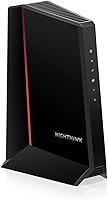
A modem router combo is one device that connects cable internet and shares it over Wi-Fi or Ethernet. If you're asking what is a modem router combo, it combines the modem that links to your provider with a router for your home devices.
On this page (9 sections)
- What is a modem router combo, and what does it do?
- Who should choose a modem router combo?
- How should you choose a modem router combo?
- Which modem router combos suit different households?
- What are the trade-offs of a modem router combo?
- How do you set up a modem router combo?
- What common modem router combo mistakes should you avoid?
- When should you choose a combo or separate equipment?
- What is a modem router combo? The short answer
A modem router combo is one device that connects cable internet and shares it over Wi-Fi or Ethernet. If you're asking what is a modem router combo, it combines the modem that links to your provider with a router for your home devices.
This arrangement can make a cable setup simpler: there is one main device to place, power and manage. Before buying, confirm that the model supports your provider and plan, then check whether its Wi-Fi and Ethernet connections suit your home.
What is a modem router combo, and what does it do?
A modem router combo connects your home network to cable internet and sends that connection to your devices. The modem communicates with your provider through a coaxial cable, while the router directs internet traffic over Wi-Fi or Ethernet.
With separate equipment, a cable modem connects to a router using an Ethernet cable. A combo contains both functions in one case, so you skip that extra device and connection.
A combo is also often called a gateway. That term can refer to equipment combining several network functions, so check the specific model’s features instead of relying on the name alone.
For the modem’s role, read what a cable modem does. Our guide to modems and gateways explains how those terms are used.
Who should choose a modem router combo?
Choose a combo if you have cable internet, want one device for the modem and Wi-Fi router, and find a model approved for your plan. It’s a practical fit when its Wi-Fi coverage and wired ports meet your household’s needs.
Separate equipment may suit you better if you need to put the router far from the cable outlet, plan to upgrade the router independently, or need a network feature the combo doesn’t provide. A combo designed for cable service also won’t replace equipment for fiber, DSL or satellite.
| A combo may fit if you… | Separate devices may fit if you… |
|---|---|
| Want one box for cable internet and Wi-Fi | Want to upgrade the modem and router at different times |
| Have a cable plan supported by the model | Need a router feature the combo doesn’t include |
| Prefer fewer devices, cables and power adapters | Need to put the router far from the coaxial outlet |
| Have a small or straightforward home network | Expect to add a mesh system or other network gear |
Placement is a key trade-off. The modem needs to reach the coaxial outlet, and the router works best where its wireless signal can reach the devices that need it.
If those two locations don’t line up in your home, separate equipment gives you more choice.
How should you choose a modem router combo?
Choose by checking service compatibility first, then plan support, Wi-Fi needs and wired connections. A fast wireless rating won’t help if the modem isn’t approved for your provider or the router can’t reach the rooms you use.
- Confirm the service type. A cable combo connects through coaxial cable. It won’t work as your modem for fiber, DSL or satellite service.
- Check the exact model with your provider. Approval can vary by provider and plan. Confirm it before buying, and check again if you change plans later.
- Match the modem to your internet plan. A model’s maximum supported speed doesn’t raise the speed in your plan. Choose support that covers your current tier and consider how much headroom you want.
- Think about the Wi-Fi layout. Compare the stated coverage with your home’s size and layout. Walls, floors and interference can affect coverage, and a published area is an estimate rather than a room-by-room promise.
- Count Ethernet connections. Make a list of devices you might want to wire, such as a computer, game console or TV. Check how many ports the combo has and whether their speed suits those devices.
- Check for phone service. If your internet plan includes a home phone, verify that the specific combo supports that voice service. Some models don’t support bundled voice plans.
- Consider the next upgrade. If you expect to add mesh Wi-Fi, move the router, or replace the modem and router on different schedules, separate equipment may be easier to adapt.
Our cable modem buying guide covers plan compatibility and modem capabilities. For provider-specific checks, see our guides to Xfinity-compatible modems and Spectrum-approved modems.
Which modem router combos suit different households?
The right combo depends on your plan, wired devices and setup preferences. These four models offer different combinations of Wi-Fi, ports, provider support and management features.
ARRIS Surfboard G34: what is this modem router combo best for?
The G34 suits cable households that want DOCSIS 3.1, Wi-Fi 6 and four wired connections in one device. ARRIS says it supports cable plans up to 2.5 Gbps, but check your provider’s approval for your exact plan.
It includes dual-band AX3000 Wi-Fi 6 and four Gigabit Ethernet ports. ARRIS lists Cox, Xfinity and Spectrum as tested and qualified providers; confirm current model support before you order.
NETGEAR Nighthawk CAX30: who should consider it?
The CAX30 fits a cable household that wants Wi-Fi 6, four Ethernet ports and app-based network controls. It supports Xfinity plans up to 800 Mbps and Spectrum and Cox plans up to 1 Gbps, subject to provider support.
The dual-band AX2700 router is rated for coverage up to 2,000 square feet and capacity for more than 25 connected devices. The Nighthawk app provides guided setup and tools for managing Wi-Fi, running speed checks, pausing devices and setting up a guest network.
Skip it if you rely on a bundled voice plan or use a service it doesn’t support. NETGEAR says the CAX30 isn’t compatible with bundled voice plans or providers such as Verizon, AT&T, CenturyLink, DirecTV and DISH.
ARRIS Surfboard G20: when does it make sense?
The G20 is a straightforward choice for a cable customer whose plan is up to 1 Gbps and who needs two wired Ethernet connections. Its DOCSIS 3.1 modem and dual-band Wi-Fi 6 router share one device.
ARRIS lists Xfinity, Cox and Spectrum compatibility. The two-port count may be limiting if you want to wire several computers, consoles or TVs, so count your connections before choosing it.
Motorola MG8702: who benefits from its features?
The MG8702 suits a cable home that wants an AC3200 Wi-Fi router, four Ethernet ports and app-based setup and management. Motorola lists it for Xfinity, Cox and Spectrum.
Its app includes guest network management, usage monitoring, speed checks, parental controls and security alerts. Consider the G34 or CAX30 if Wi-Fi 6 is a priority, since the MG8702’s stated router standard is AC3200.
What are the trade-offs of a modem router combo?
A combo saves space and keeps setup to one device, but it ties the modem and router together. If either part no longer meets your needs, replacing the unit may mean replacing both functions at once.
| Trade-off | What it means for you |
|---|---|
| One main device | Fewer boxes, cables and power connections to manage |
| Shared upgrade path | A router upgrade may also mean replacing a working modem |
| Fixed placement | The unit needs to reach the coaxial outlet and a useful Wi-Fi location |
| Provider checks still matter | Support depends on the exact model and plan |
| One place to start troubleshooting | A connection issue could involve the modem, router, cable or provider |
A separate modem and router add a device and a connection between them, but let you place the router where it works better for Wi-Fi. They can also make it easier to replace one part without changing the other.
How do you set up a modem router combo?
To set up a combo, connect it to coaxial cable and power, activate it with your provider, then connect your devices. The exact activation steps vary, so follow the instructions for your provider and model.
- Confirm that your provider supports the exact model and your plan.
- Connect the coaxial cable to the combo and tighten the connector by hand.
- Attach the power adapter and wait for the device to start.
- Activate the modem with your provider. You may need to use the provider’s website or contact its support team.
- Join the default Wi-Fi network, or personalize its name and password.
- Connect devices that need a wired connection to the Ethernet ports.
Place the combo in an open spot with space around it, near the coaxial outlet and reasonably central to the devices that use Wi-Fi. Avoid hiding it in a closed cabinet, where its signal and airflow may be restricted.
Keep the network name and password somewhere you can find them, and use a strong password for your Wi-Fi. If you change the network name or password, reconnect your phones, computers and smart devices using the new details.
If the modem doesn’t come online, check the coaxial and power connections, then check your provider’s activation status. Our guide to blinking modem lights explains common status indicators, and how to connect a modem to a router covers the separate-device setup.
What common modem router combo mistakes should you avoid?
The biggest buying mistake is choosing a combo before confirming provider and plan support. Check the exact model with your provider first, and verify voice-service support if you use a bundled home phone.
Another common mistake is treating the maximum speed or coverage figure as a promise about your own connection. Your internet tier, home layout, walls, interference and connected devices all affect what you experience.
It’s also easy to overlook port needs. Count the devices you may want to connect with Ethernet, and leave room for a future computer, console or TV if you expect your setup to grow.
Finally, don’t buy a cable combo for a different internet service. If your home uses fiber, DSL or satellite, look for equipment designed for that service type instead.
When should you choose a combo or separate equipment?
Choose a modem router combo when you want a simpler cable setup and can find a provider-approved model with enough plan support, Wi-Fi coverage and Ethernet ports. The G34 suits households that want four wired ports and Wi-Fi 6; the G20 fits plans up to 1 Gbps with two wired connections.
Consider the CAX30 if its provider limits fit your plan and you want app controls, or the MG8702 if AC3200 Wi-Fi and four Ethernet ports fit your needs. Skip a combo if you need bundled voice support that the model lacks, use a non-cable service, or need to place the router away from the coax outlet.
For a wider set of options, compare our best cable modem router combos. Choose separate devices when placement flexibility or independent upgrades matter more than having one box.
What is a modem router combo? The short answer
A modem router combo is a single device with a cable modem and Wi-Fi router inside. It connects to your cable provider and shares the connection with your home devices.
Pick one if its provider support, plan capacity, Wi-Fi and ports match your home. Choose separate equipment if you need more freedom to place or upgrade the router; our guide to the best modem router combos can help you compare models.