What Modem Do You Need for Gigabit Internet?
For gigabit cable internet, choose a DOCSIS 3.1 modem approved for your provider and plan. A 1 GbE port suits service capped at 1 Gbps; choose 2.5 GbE if your plan and router can use a faster connection.
On this page (9 sections)
- How do you choose a modem for gigabit internet?
- Is DOCSIS 3.1 enough for a gigabit plan?
- When does a 2.5 GbE port help?
- Which cable modem fits your gigabit plan?
- How do you set up a cable modem?
- What can limit your gigabit speed?
- How should you care for and use a cable modem?
- What mistakes should you avoid when choosing a modem?
- Which modem for gigabit internet should you choose?
For gigabit cable internet, choose a DOCSIS 3.1 modem approved for your provider and plan. A modem for gigabit internet with a 1 GbE port can suit service capped at 1 Gbps, while a 2.5 GbE port gives a compatible router room for a faster plan.
Start by checking the exact modem model against your provider's approved list. Then compare the plan's download and upload tiers with the modem's Ethernet port and the router you already own.
This guide compares four modem-only options. If you want more models, see our DOCSIS 3.1 cable modem guide; for service above 1 Gbps, use our multi-gig cable modem guide.
How do you choose a modem for gigabit internet?
A provider-approved DOCSIS 3.1 modem is the starting point for gigabit cable service. Choose the Ethernet port based on your plan and router, then confirm the model supports your provider's speed tier.
| Your plan or goal | What to check |
|---|---|
| Cable service up to 1 Gbps | DOCSIS 3.1 and approval for your exact plan |
| Cable service above 1 Gbps | Approval for the plan, plus a 2.5 GbE modem port and compatible router |
| Wi-Fi across the home | A separate router or mesh system, unless you buy a gateway |
| Fiber, DSL or satellite | Equipment made for that type of service |
A modem's maximum speed does not guarantee that your plan will reach it. Your provider's network, plan tier, router connection and device also affect the speed available to you.
A 1 GbE port can be enough for a plan capped at 1 Gbps, but it limits the connection between the modem and router. A 2.5 GbE port matters when the plan and the router's WAN port can both use a faster link.
Is DOCSIS 3.1 enough for a gigabit plan?
DOCSIS 3.1 is a sensible baseline for gigabit cable service. All four models here use it, but your provider still needs to approve the exact modem for your plan.
Compatibility can vary by provider and speed tier. A modem that works with a provider may have a lower supported plan limit, or may not support a bundled phone plan.
Our cable modem buying guide covers provider approval, DOCSIS support and modem-only setups. For a plain-language explanation of the equipment, see what a cable modem does.
When does a 2.5 GbE port help?
A 2.5 GbE port is useful when your plan and router can use more than a 1 Gbps wired link. It doesn't increase the speed included in your plan, so a faster port may not benefit a household that stays on a plan capped at 1 Gbps.
Check the router's WAN port before paying for multi-gig capability. If it has only a 1 GbE WAN port, the connection from modem to router remains limited to that link speed.
Port count needs context too. The SB8200 has two 1 GbE ports, but those are not the same as one 2.5 GbE connection.
The S34 has one 2.5 GbE port and one 1 GbE port, while the MB8611 has one 2.5 GbE port.
Which cable modem fits your gigabit plan?
The best option depends on your provider's plan limits and how the modem will connect to your router. These four models cover basic gigabit links and faster wired connections.
ARRIS Surfboard SB8200 for gigabit internet: two 1 GbE ports
The SB8200 is a DOCSIS 3.1 modem with two 1 GbE ports. ARRIS describes it as supporting cable plans up to 2 Gbps, but the two ports don't combine into a single 2.5 GbE link.
It's modem-only, so you need a separate router or mesh system for Wi-Fi. ARRIS names Cox, Xfinity and Spectrum as tested and qualified providers, with a model and plan check recommended before activation.
Choose the SB8200 if your provider approves it and a 1 GbE link fits your router and plan. Skip it if your goal is a single multi-gig connection from modem to router; compare the S34 or MB8611 instead.
ARRIS Surfboard S34 for gigabit internet: a 2.5 GbE connection
The S34 combines one 2.5 GbE port and one 1 GbE port. ARRIS says it supports cable plans up to 2.5 Gbps and next-generation upload tiers, subject to plan availability and provider support.
The S34 is modem-only and needs a separate router or mesh system for Wi-Fi. ARRIS names Cox, Xfinity and Spectrum as tested and qualified, but recommends checking the exact model with your provider.
Choose it if your service tier and router can use its faster port, or if a move to multi-gig service is part of your plans. Skip the extra port capacity if you expect to stay on a 1 Gbps plan and your router has only a 1 GbE WAN port.
Motorola MB8611 for gigabit internet: a multi-gig port
The MB8611 is a DOCSIS 3.1 modem with one 2.5 GbE port. Motorola says it supports downstream speeds just below 2,500 Mbps and upstream speeds up to 800 Mbps when the service plan supports them.
This isn't a router, so you'll need separate Wi-Fi equipment. Motorola names Xfinity, Cox and Spectrum among its supported providers and advises checking compatibility by plan tier.
Choose the MB8611 if its provider support fits your plan and you want a single 2.5 GbE connection. Skip it if your router has only a 1 GbE WAN port and you don't expect to upgrade; the modem's faster port won't remove that bottleneck.
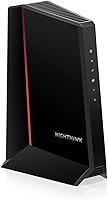
NETGEAR Nighthawk CM1000 for gigabit internet: a 1 GbE port
The CM1000 is a DOCSIS 3.1 modem with one Gigabit Ethernet port. NETGEAR lists support for Spectrum and Cox plans up to 1 Gbps, and Xfinity plans up to 800 Mbps, so its stated Xfinity limit does not cover a full 1 Gbps plan.
It's modem-only and needs a separate router or mesh system for Wi-Fi. NETGEAR also says the CM1000 doesn't support bundled voice plans and is for US cable internet.
Choose it if your provider approves the model and your plan fits its stated limit. Skip it for a 1 Gbps Xfinity tier or service above 1 Gbps; confirm your plan's limit before deciding.
How do you set up a cable modem?
Connect the modem, activate it with your provider, then attach your router. A new modem won't provide internet just because its power light turns on; activation must be complete.
- Confirm your provider approves the exact modem model for your plan.
- Disconnect your current modem and connect the coax cable to the new one.
- Connect the power supply and wait for the status lights to settle.
- Follow your provider's activation steps online or by phone.
- Connect the modem's Ethernet port to the router's WAN port.
- Set up or reconnect your Wi-Fi network through the router.
Keep the modem's power supply and any activation details handy while you work. If the provider can't activate the modem, recheck the model number, plan tier and account details before changing other network settings.
If you need help with the router connection, follow our step-by-step modem-to-router guide. When a status light keeps blinking, our guide to what modem lights mean can help you identify what to check next.
What can limit your gigabit speed?
The modem is one link in a chain. Your plan, provider network, router port, Ethernet connection and device can each limit the speed you receive.
For example, a 2.5 GbE modem connected to a router's 1 GbE WAN port has a 1 GbE connection to that router. Wi-Fi conditions and the capabilities of your connected device also affect the speed you see.
Gigabit usually describes the plan's advertised maximum, not a speed you will get at every moment. If wireless coverage is the main issue, compare a modem and gateway before choosing a separate modem and router.
How should you care for and use a cable modem?
Give the modem ventilation and keep its cables secure. Place it on a stable surface with open space around it, rather than inside a crowded cabinet or under other equipment.
Avoid bending the coax or Ethernet cable sharply, and check that each connector is firmly attached if the connection drops. Restarting the modem can help after a brief service issue, but repeated outages are a reason to check provider status and activation before replacing equipment.
Use the status lights as a quick guide to power, signal and online connection. If you move the modem, reconnect the coax and Ethernet cables in the same order, then give it time to reconnect.
What mistakes should you avoid when choosing a modem?
The most common mistake is buying by speed label alone. Provider approval, plan limits and router ports decide whether the modem fits your connection.
- Skipping the provider check: Confirm the exact model and plan tier before you order.
- Treating two 1 GbE ports as one 2.5 GbE port: The SB8200's two ports are separate connections.
- Ignoring the router's WAN speed: A 1 GbE WAN port limits a faster modem connection.
- Expecting built-in Wi-Fi: All four models in this guide are modem-only.
- Overlooking phone service: The CM1000 isn't compatible with bundled voice plans.
- Using a cable modem with the wrong service type: These are cable modems, not fiber, DSL or satellite equipment.
A provider's approved list is the best place to settle questions about plan and account compatibility. If you need phone service through the modem, confirm that requirement directly before buying.
Which modem for gigabit internet should you choose?
Choose the SB8200 or CM1000 for an approved plan that fits a 1 GbE connection; compare the CM1000's plan limits carefully, especially if you have Xfinity. Pick the S34 or MB8611 when your provider, plan and router support a 2.5 GbE link.
For more options, compare the best DOCSIS 3.1 modems. If your plan is faster than 1 Gbps, use the multi-gig cable modem guide to narrow the choices.
Frequently asked questions
Do you need DOCSIS 3.1 for gigabit internet?
For a gigabit cable plan, DOCSIS 3.1 is a sensible starting point. Check your provider's approved modem list and your plan tier before buying, since support can vary by provider and plan.
DOCSIS 3.1 is for cable service; fiber, DSL and satellite need equipment designed for those services.
Is a 1 Gbps modem enough for gigabit internet?
A modem with a 1 GbE port may suit a cable plan capped at 1 Gbps, provided your provider approves it for that tier. The port limits the wired connection, and actual speed varies.
If your plan exceeds 1 Gbps, compare a modem with a 2.5 GbE port and confirm your provider supports it.
Does a gigabit cable modem include Wi-Fi?
Many cable modems are modem-only devices and don't provide Wi-Fi. The SB8200, S34, MB8611 and CM1000 need a separate router or mesh system for wireless coverage.
If you prefer one device, compare a gateway and check that it supports your provider and plan.
Will a 2.5 GbE modem make my internet faster?
A 2.5 GbE port can support a faster wired connection, but it doesn't raise the speed included in your internet plan. Your provider, modem approval, router, Ethernet link and connected device all affect the speed you can use.