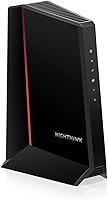
ARRIS Surfboard S33 Review: Worth It? (October 2026)
In this ARRIS Surfboard S33 review, the S33 suits cable users whose provider approves it and who want a multi-gig modem with a separate router. Check the plan and router ports before buying.
On this page (7 sections)
- ARRIS Surfboard S33 review: who is it for?
- What does the S33's 2.5 Gbps port mean for your plan?
- What should you check before buying the S33?
- Which alternatives fit different needs?
- How do you set up and care for an S33?
- What mistakes should you avoid with the S33?
- Which buyer should choose the ARRIS Surfboard S33?
The ARRIS Surfboard S33 is a DOCSIS 3.1 cable modem with a 2.5 Gbps Ethernet port for households whose cable provider approves it. This ARRIS Surfboard S33 review covers how to choose it, what you need for setup, and when another modem is a better fit.
The S33 is a modem only, so it won't create a Wi-Fi network by itself. You'll need a separate router or mesh system, and your provider must approve the exact modem for your service tier.
ARRIS Surfboard S33 review: who is it for?
The S33 suits cable customers who want a compact modem with a multi-gig Ethernet port and already have, or plan to buy, a separate router. It makes the most sense when the provider approves the model and your plan can use its available capacity.
The modem has one 2.5 Gbps Ethernet port and one 1 Gbps port. That gives you a faster wired link to a capable router, plus another port for a wired device, though the way the extra port works can depend on provider configuration.
ARRIS Surfboard S33: Best for compact spaces

- DOCSIS 3.1
- 2.5 Gbps and 1 Gbps Ethernet ports
- Modem only
The S33 combines a 2.5 Gbps port with a second 1 Gbps port in a compact modem-only design. Choose it when your provider approves it and you have a separate router.
Pros
- Two Ethernet ports
- Supports cable plans up to 2.5 Gbps
- Compact design
Cons
- Requires a separate Wi-Fi router
- Provider and plan compatibility need confirmation
The S33 is a poor fit if you need a single box with built-in Wi-Fi, use fiber or DSL, or have satellite service. If you want one device for modem and Wi-Fi, compare cable modem router combos.
What does the S33's 2.5 Gbps port mean for your plan?
The S33's 2.5 Gbps Ethernet port can connect to a multi-gig cable plan, but it doesn't set the speed your provider delivers. Your plan, provider approval, router, cables and connected devices all affect the result.
Start with your internet plan's speed tier. If the service is below gigabit and you don't expect to upgrade, the S33's extra capacity may not help enough to justify choosing it over a simpler approved modem.
For a multi-gig plan, check the full path from the modem to your devices. A router needs a port that can accept the modem's faster connection, and your computer or other wired device also needs compatible network hardware to benefit from multi-gig speeds.
The extra 1 Gbps port can be useful for another wired connection, but don't assume both ports provide separate full-speed internet connections. Ask your provider how it configures the second port for your account.
If you want to compare cable modem standards and speed tiers, keep our guide to DOCSIS 3.1 cable modems open while you check your plan. For a closer look at faster wired options, see our multi-gig cable modem guide.
What should you check before buying the S33?
Confirm your internet type, provider approval and speed tier before choosing the S33. It's designed for cable service and won't replace equipment for fiber, DSL or satellite internet.
Check the provider's current compatibility list for the exact model, then ask whether it is approved for your plan. Provider support can differ by service tier, even when a modem is compatible with that provider in general.
Next, check your home network. The S33 needs a separate router or mesh system for Wi-Fi, and the router should have a port suited to the speed you want to receive from the modem.
Also consider whether you need the second Ethernet port. If all your wired devices connect through a router, that extra port may not matter.
If you have a specific wired device to connect directly, confirm with your provider that the additional port is enabled for that use.
If you're comparing ARRIS models, our ARRIS Surfboard modem guide covers other choices. For a direct comparison with a popular DOCSIS 3.0 model, see ARRIS Surfboard S33 vs SB8200.
Which alternatives fit different needs?
The S33 is a compact two-port ARRIS modem, while the S34 adds support for next-generation upload tiers and keeps both a 2.5 Gbps and a 1 Gbps Ethernet port. Motorola's MB8611 and Hitron's CODA56 each have a single 2.5 Gbps port, with different features and support details.
ARRIS Surfboard S34: Best for faster uploads

- DOCSIS 3.1
- 2.5 Gbps and 1 Gbps Ethernet ports
- Modem only
A newer ARRIS option with a 2.5 Gbps port, a second 1 Gbps port and support for next-generation upload tiers. Confirm the model and plan with your provider.
Pros
- Two Ethernet ports
- Supports cable plans up to 2.5 Gbps
- ARRIS says it supports next-generation upload tiers
Cons
- Requires a separate Wi-Fi router
- Not for fiber, DSL or satellite
Choose the S34 if upload capacity is a priority and your provider offers a compatible next-generation tier. ARRIS describes support for those tiers, but availability depends on your provider and plan.
Motorola MB8611: Best for latency control
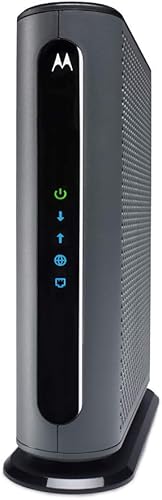
- DOCSIS 3.1
- 2.5 Gbps Ethernet port
- Active Queue Management
The MB8611 pairs a 2.5 Gbps port with Active Queue Management, which Motorola says reduces internet latency. Check the provider's approved models and speed tiers.
Pros
- 2.5 Gbps Ethernet port
- Active Queue Management
- Two-year manufacturer warranty
Cons
- Requires a separate router
- One Ethernet port
The MB8611 may suit you if you want its Active Queue Management feature, which Motorola says can reduce latency. It has one Ethernet port and requires a separate router for Wi-Fi.
Hitron CODA56: Best for Xfinity and Cox
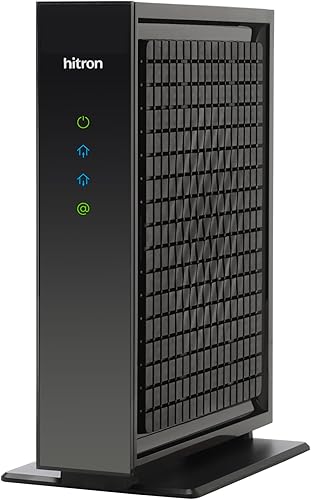
- DOCSIS 3.1
- 2.5 Gbps Ethernet port
- Modem only
The CODA56 is a modem-only option for compatible cable plans up to 2.5 Gbps. Hitron lists Xfinity, Spectrum and Cox among compatible providers, but advises checking your plan.
Pros
- 2.5 Gbps Ethernet port
- Supports DOCSIS 3.0 networks
- Includes an Ethernet cable
Cons
- No built-in Wi-Fi
- Not for fiber, DSL, satellite or fixed wireless
The CODA56 may fit a compatible cable customer who wants DOCSIS 3.1 and a 2.5 Gbps port. It also supports DOCSIS 3.0 networks, but it doesn't include Wi-Fi and needs a separate router for wireless coverage.
Our ARRIS vs NETGEAR modem comparison can help if you're deciding between brands. Compare provider approval, plan fit and port needs before settling on a name.
How do you set up and care for an S33?
Set up the S33 by connecting the coax cable and power, activating it with your provider, then connecting a separate router. Keep your provider account details nearby because activation may require the modem's identifying information.
Use the router's setup instructions to create your Wi-Fi network after the provider confirms activation. Place the modem where its lights are visible and where you can reach its coax and power connections without straining the cables.
Keep the modem in an open, dry spot with room around it. Avoid covering it with papers or placing it where other equipment blocks access to the connectors or status lights.
If the modem does not come online, check that the coax connection is secure and that the Ethernet cable runs from the modem to the router's internet or WAN port. Then ask your provider to confirm activation and signal status.
Our modem setup guide walks through the connection from modem to router. If status lights remain unclear, use our guide to modem lights to understand what to check next.
What mistakes should you avoid with the S33?
The most common buying mistake is treating a 2.5 Gbps port as proof that a provider will approve the modem or deliver that speed. Confirm the model and plan directly with your provider before replacing rented equipment.
Another mistake is forgetting the router. The S33 provides the modem connection, not Wi-Fi, so budget for a router or mesh system if you don't already have one.
Don't assume that a slower plan will become faster just because the modem supports multi-gig service. The plan sets the service tier, and each device in your home network must also be able to handle the speed you want.
Finally, avoid buying the S33 for fiber, DSL, satellite or fixed wireless service. It is a cable modem, so first verify that your home internet connection uses cable.
Which buyer should choose the ARRIS Surfboard S33?
Choose the S33 if you have cable internet, your provider approves it for your plan, and you want a compact modem with a 2.5 Gbps port and a second wired port. It is a practical match when you already use a separate router and expect to benefit from a multi-gig connection.
Pick the S34 if support for next-generation upload tiers matters and your provider offers them. Consider the MB8611 if you value its Active Queue Management feature, or the CODA56 if its provider support and DOCSIS 3.0 compatibility fit your situation.
Skip the S33 if you need built-in Wi-Fi, use a non-cable service, or have a slower plan with no expected upgrade. The right modem is the one your provider approves for your service and that fits the router and devices you already use.
For this ARRIS Surfboard S33 review, the decision is simple: choose the S33 for an approved cable plan, multi-gig needs and a separate router. Confirm the model with your provider, then use our cable modem buying guide to compare the rest of your setup.
Frequently asked questions
Does the ARRIS Surfboard S33 have Wi-Fi?
No. The S33 is a cable modem, so you need a separate Wi-Fi router or mesh system for wireless coverage.
Connect the modem to the router after your provider activates the service, then follow the router's setup steps to create your home network.
What internet speed does the ARRIS Surfboard S33 support?
The S33 supports cable internet plans up to 2.5 Gbps and has a 2.5 Gbps Ethernet port plus a 1 Gbps port. Your provider, service tier, router and connected devices all affect the speed you can receive.
Is the ARRIS Surfboard S33 compatible with Xfinity, Cox and Spectrum?
The S33 is named for Charter, Comcast, Cox, Spectrum and Xfinity service, but compatibility can depend on your exact plan and provider approval. Check the provider's current modem list before buying and confirm that the S33 is accepted for your speed tier.
Can the ARRIS Surfboard S33 replace a modem rental?
It may let you use your own modem if your cable provider approves the S33 for your plan. Ask the provider whether using a customer-owned modem changes equipment charges, activation steps or support, since those terms vary by plan and provider.