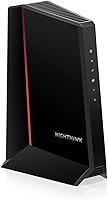
ARRIS S33 vs SB8200: Is Multi-Gig Worth It? (October 2026)
For the ARRIS S33 vs SB8200, choose the S33 if your plan and router can use 2.5 Gbps Ethernet; choose the SB8200 if 1 Gbps ports are enough. Both need a separate Wi-Fi router.
On this page (5 sections)
For the ARRIS S33 vs SB8200, choose the S33 if your plan and router can use 2.5 Gbps Ethernet; choose the SB8200 if 1 Gbps ports are enough. Both are DOCSIS 3.1 cable modems, and neither includes Wi-Fi.
The difference that should guide your choice is the Ethernet connection to your router. The SB8200 has two 1 Gbps ports, while the S33 has one 2.5 Gbps port and one 1 Gbps port.
A modem's plan support alone doesn't guarantee a faster connection. Your provider must approve the model, and the router and wired devices must also support the speed you want.


ARRIS S33 vs SB8200: which modem fits your setup?
Choose the SB8200 for a 1 Gbps network path and the S33 when a router or wired device can use 2.5 Gbps Ethernet. Check your provider's approved model list and your router's ports before buying.
The SB8200 supports cable plans up to 2 Gbps, but its two Ethernet ports are each 1 Gbps. The S33 supports plans up to 2.5 Gbps and offers a 2.5 Gbps port alongside a 1 Gbps port.
Those plan capacities describe what the modem supports, not a promise of the speed you'll receive. The provider's plan, network conditions, router, and connected equipment all affect actual service.
If you're comparing other 2.5 Gbps options, see the best multi-gig cable modems. For a broader view of ARRIS models, use our guide to the best ARRIS Surfboard cable modems.
What does 2.5 Gbps change in the ARRIS S33 vs SB8200?
The S33's 2.5 Gbps port can connect to a compatible router or device at a higher Ethernet link speed than a 1 Gbps port. It helps only when the plan and the equipment on the connection can use that faster link.
Check the router's port specifications before choosing the S33. If its modem-facing port supports only 1 Gbps, that link can limit the connection regardless of the S33's faster port.
The SB8200's two ports do not combine into one 2 Gbps connection for a single router or device. If you need one faster link between the modem and router, the S33's 2.5 Gbps port is the relevant difference.
Who should buy the SB8200?
The SB8200 suits you if your plan and network use 1 Gbps Ethernet, your provider approves the model, and you don't need a 2.5 Gbps modem-to-router connection. Its DOCSIS 3.1 support and two 1 Gbps ports fit many cable setups.
It can also make sense if you already have a compatible router with 1 Gbps Ethernet and don't expect to move to a faster tier soon. The port speed matches that setup without paying for a capability the router can't use.
Skip the SB8200 if you need a 2.5 Gbps link to a compatible router or device. Also skip it if you use fiber, DSL, or satellite service, since it is a cable modem.
Will the S33 or SB8200 work with your internet plan?
The best fit is a model your provider approves for your exact service tier. Confirm compatibility directly with your provider before replacing rented equipment, even if a modem's maximum plan support appears sufficient.
ARRIS identifies the SB8200 as qualified for Xfinity, Cox, and Spectrum. The S33 is also identified for those providers, but support can vary by model and plan.
If you use Xfinity, check Xfinity-compatible modems for model guidance. Cox customers can compare their options in the Cox approved modem list.
Cable modems don't work with fiber, DSL, or satellite connections. If you're unsure which service type reaches your home, confirm it with your provider before choosing between these models.
Is multi-gig worth it for the ARRIS S33 vs SB8200?
The S33's multi-gig Ethernet is worth considering when your plan and router can use a connection faster than 1 Gbps. For a plan and router limited to 1 Gbps, the SB8200's Ethernet ports may be sufficient, subject to provider support.
Think about the whole path from the provider to your device. A faster modem port won't raise the speed of a 1 Gbps router connection, and a faster router connection won't change the plan your provider supplies.
If you expect to upgrade soon, check whether the faster plan is available and whether the provider supports the S33 on that tier. If those details are uncertain, choose around your current needs and revisit the modem when your service changes.
How should you compare upload speeds?
Don't choose based on an Ethernet port alone if upload speed is a priority. The port's link rate and the upload speed available from your cable plan are different limits.
The S33 supports upstream data transfer rates up to 2.5 Gbps, but your provider controls the service tier and modem approval. Ask the provider what upload speed your plan offers and whether it supports the S33's service features.
The S34 is another ARRIS option with a 2.5 Gbps port and a separate 1 Gbps port. It supports next-generation upload tiers offered by providers, so it may merit a closer look if your provider offers those tiers.
For another comparison focused on gigabit Ethernet, read ARRIS SB8200 vs NETGEAR CM1000.
How do you set up the S33 or SB8200?
Connect the coax cable and power, activate the modem with your provider, then connect a separate router for Wi-Fi. Both models are modem-only devices, so they don't create a wireless network on their own.
Before disconnecting your current modem, confirm the new model is approved and have your account or activation details ready. Follow your provider's activation steps, then connect the modem's Ethernet port to the router.
For the S33, use the 2.5 Gbps port for the router connection if the router supports that speed. For the SB8200, the router link uses a 1 Gbps port.
Give the modem room around its vents and indicator lights, and keep it near the coax connection and router to avoid awkward cable runs. Avoid placing it where furniture or other equipment blocks access to the connections.
If the modem won't come online after activation, check that the coax and power connections are secure, then contact your provider to confirm activation and service status. Our guide to modem connection problems walks through common checks.
What mistakes can lead to the wrong modem choice?
The most common buying mistake is treating a modem's maximum plan support as a guarantee of delivered speed. Provider approval and the limits of your router and devices still matter.
Another mistake is assuming two 1 Gbps ports add up to a single 2 Gbps port. The SB8200's ports are separate connections, each rated at 1 Gbps.
You can also overlook the router requirement. If you need Wi-Fi and don't already own a router or mesh system, include that separate equipment in your decision.
Finally, don't buy either modem for a non-cable connection. Confirm that your home has cable internet before comparing the S33 and SB8200.
Which ARRIS modem should you choose?
Pick the SB8200 if provider-approved 1 Gbps Ethernet meets your plan and router; pick the S33 if your provider approves it and your setup can use 2.5 Gbps Ethernet. For the ARRIS S33 vs SB8200 decision, the port your router can use is the clearest dividing line.
Choose the S34 instead if its separate 2.5 Gbps and 1 Gbps ports, plus support for next-generation upload tiers, better fit your provider's service. Whichever modem you select, plan for a separate router and confirm compatibility before activation.
For a quick explanation of the device you're choosing, see what a cable modem does.
Frequently asked questions
Is the ARRIS S33 better than the SB8200?
The S33 is a better fit when your cable plan and router can use its 2.5 Gbps Ethernet port. The SB8200 fits setups that need 1 Gbps ports and don't benefit from a faster Ethernet link.
Both are DOCSIS 3.1 modem-only models, so each needs a separate router for Wi-Fi.
Can the SB8200 deliver 2 Gbps?
The SB8200 supports cable plans up to 2 Gbps, but each of its Ethernet ports is 1 Gbps. The plan figure doesn't mean one connected device gets a 2 Gbps link, and the two ports shouldn't be treated as one combined connection.
Check your provider's plan and connection requirements before choosing it.
Does the ARRIS S33 include Wi-Fi?
No. The S33 is a cable modem, so you need a separate Wi-Fi router or mesh system for home wireless coverage.
The SB8200 and S34 are also modem-only models.
Check the router's Ethernet port speed as well, since a 1 Gbps port can limit a faster wired connection.
Will the S33 or SB8200 work with my cable provider?
The SB8200 and S33 are identified for Cox, Xfinity, and Spectrum. Provider support depends on the exact model and plan, so confirm approval before replacing a rented modem.
Neither model works with fiber, DSL, or satellite service.
Both are for cable internet.