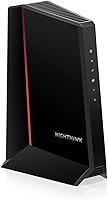
NETGEAR Nighthawk CAX30 Review: Worth It? (October 2026)
In this NETGEAR CAX30 review, the CAX30 stands out for cable households that want a DOCSIS 3.1 modem and Wi-Fi 6 router in one device. It supports Xfinity plans up to 800 Mbps and Spectrum or Cox plans up to 1 Gbps, with ISP activation required.

On this page (8 sections)
- NETGEAR Nighthawk CAX30 review: the quick take
- What internet plans does the CAX30 support?
- How well does the CAX30 fit a home's Wi-Fi and wired needs?
- How do you set up and activate the CAX30?
- What security and care should CAX30 owners plan for?
- Which alternatives make more sense than the CAX30?
- Is the NETGEAR Nighthawk CAX30 worth choosing?
- Frequently asked questions
The NETGEAR Nighthawk CAX30 review comes down to fit: it suits cable households that want a DOCSIS 3.1 modem and Wi-Fi 6 router together, provided their plan and provider are supported. It works with Xfinity plans up to 800 Mbps and Spectrum or Cox plans up to 1 Gbps.
The CAX30 has four Gigabit Ethernet ports, app-guided setup, and a Wi-Fi coverage rating of up to 2,000 sq ft. Skip it if you use fiber, DSL, satellite, bundled voice, need mesh coverage, or have a plan beyond its stated provider limits.
NETGEAR Nighthawk CAX30 review: the quick take
The CAX30 is a sensible one-box choice for a supported US cable plan that falls within the model's provider limits. Its DOCSIS 3.1 modem handles cable service, while its dual-band AX2700 Wi-Fi 6 router connects wireless devices.
NETGEAR Nighthawk CAX30: Best for single-device homes

- DOCSIS 3.1 modem
- Dual-band Wi-Fi 6 AX2700
- Up to 2,000 sq ft coverage
- Four Gigabit Ethernet ports
The CAX30 combines a cable modem and Wi-Fi 6 router for homes on supported Xfinity, Spectrum, or Cox plans. It offers app-guided setup, four wired ports, and coverage rated for up to 2,000 sq ft.
Pros
- Combines modem and router in one device
- Four Gigabit Ethernet ports
- Nighthawk app offers guided setup and network controls
Cons
- Xfinity plan support is up to 800 Mbps
- Does not support bundled voice plans
- Wi-Fi coverage depends on home layout and materials
This combination cuts down on separate equipment and gives you four ports for wired devices. The tradeoff is that the modem and router come as one unit: if your needs change, you may prefer the flexibility of a separate modem and router.
The CAX30's Wi-Fi rating is up to 2,000 sq ft, but a rating cannot predict the signal in every room. Walls, floors, building materials, and device placement all affect coverage.
For many homes, putting the unit in a central, open spot is a better starting point than placing it in a corner or closed cabinet.
Who should choose this NETGEAR CAX30?
Choose the CAX30 if your service is cable from Xfinity, Spectrum, or Cox, your plan is within the model's supported limit, and you want one device for modem and router duties. It is also a good fit if you have several nearby devices that can connect over Ethernet.
Skip it if your provider is Verizon, AT&T, or CenturyLink, or your internet comes from DirecTV, DISH, fiber, DSL, or satellite. It also does not support bundled voice plans.
Check the model and plan with your provider before buying, even if the provider name appears in the compatibility information.
What internet plans does the CAX30 support?
The CAX30 supports Xfinity cable plans up to 800 Mbps and Spectrum or Cox plans up to 1 Gbps. The exact service tier and model approval can depend on your provider, so confirm both before you replace rented equipment.
| Provider | Stated plan limit |
|---|---|
| Xfinity | Up to 800 Mbps |
| Spectrum | Up to 1 Gbps |
| Cox | Up to 1 Gbps |
DOCSIS 3.1 is designed for Gigabit+ cable plans, but the provider-specific limit still matters. A modem's technology does not override a provider's compatibility rules or make an unsupported plan work.
If you have a faster plan, are about to upgrade, or use a provider not named here, compare the exact model number against the provider's current requirements. Our guides to Xfinity compatible modems, Spectrum approved modems, and the Cox approved modem list can help you narrow the options.
A common buying mistake is to check only the provider and overlook the plan cap. Another is to assume that a modem router combo supports home phone service because it handles internet and Wi-Fi.
The CAX30 does not support bundled voice plans, so keep a separate voice requirement in the decision.
How well does the CAX30 fit a home's Wi-Fi and wired needs?
The CAX30 fits homes that can use one centrally placed router and do not need mesh equipment. Its dual-band AX2700 Wi-Fi 6 is rated for up to 2,000 sq ft, and its four Gigabit Ethernet ports handle nearby wired devices.
That coverage figure is a planning guide, not a guarantee for each floor or room. A long floor plan, thick walls, or a router tucked behind furniture can leave weak spots even if the home's total area is below the rating.
Plan the location before setup. Choose a place near the coaxial cable connection with open space around the device, and avoid hiding it inside a cabinet.
If your home has multiple floors or distant rooms that need a strong signal, compare the CAX30 with a mesh system instead of expecting a single router to cover every corner.
Use Ethernet for stationary devices when you can. A wired connection can be a practical choice for a desktop, console, or streaming device near the CAX30, while phones and laptops can use Wi-Fi.
Four ports provide room for multiple direct connections without an extra switch in a small setup.
The Nighthawk app supports Wi-Fi name and password management, guest networks, device pauses, and speed tests. The app requires an active internet connection for the features described by NETGEAR.
How do you set up and activate the CAX30?
The CAX30 needs provider activation after installation, and the Nighthawk app can guide setup. Prepare your account details and check the provider's activation instructions before disconnecting your current modem.
Start by connecting the coaxial cable and power, then wait for the modem to come online. Connect a phone or computer to the default Wi-Fi network or use Ethernet, open the app or web browser setup, and follow the prompts.
Once the provider has activated the modem, set a Wi-Fi name and a strong password that household members can recognize. Reconnect devices one at a time, and update saved Wi-Fi details on smart home equipment that does not reconnect automatically.
If activation stalls, check that the coaxial cable is secure and that you selected the correct account or service information. Then contact the provider to confirm the modem is registered and supported for your plan.
Restarting repeatedly before activation is complete is unlikely to resolve a provider-side registration issue.
Keep the quick-start guide and the model name handy during activation. If you later move the modem, change providers, or alter your plan, you may need to check compatibility and activation again.
What security and care should CAX30 owners plan for?
The CAX30 includes WPA3 Wi-Fi encryption, firewall protection, and denial-of-service attack prevention. NETGEAR Armor has a 30-day free trial, after which continued use requires a separate subscription.
Change the default Wi-Fi credentials during setup, and use a password that is not shared with other accounts. A guest network can give visitors internet access without sharing the main network password.
The Nighthawk app can help manage devices and run speed tests. If you notice a slowdown, compare a wired speed test with a wireless one near the router, then check whether the issue affects one device or the entire connection.
That distinction can help you decide whether to troubleshoot Wi-Fi placement, the device, or your provider connection.
Give the CAX30 open air space and keep its vents clear. Avoid stacking it under other electronics or placing it where it can be knocked or exposed to moisture.
When cleaning around it, keep cables connected securely and follow the device's care instructions.
A frequent mistake is to treat Wi-Fi speed as the same thing as the cable plan's internet speed. The number of connected devices, distance from the router, and the device's own wireless capability affect the result.
Use Ethernet for a stationary device when you want to reduce Wi-Fi variables.
Which alternatives make more sense than the CAX30?
The CAX30 is best when you want a single cable modem and router with straightforward provider fit. Consider an alternative when you need a higher stated plan ceiling, a 2.5 GbE wired port, or wider mesh coverage.
The G34 may suit a household planning for a higher-speed cable tier, with provider confirmation still required. Its stated plan support reaches up to 2.5 Gbps, while the CAX30's provider limits are lower for Xfinity and top out at 1 Gbps for Spectrum and Cox.
Choose the G36 if a faster wired link is important to your setup and your provider approves it for your plan. Its port mix gives you an option for a device that can use 2.5 GbE, alongside standard Gigabit connections.
For a closer head-to-head, see NETGEAR CAX30 vs ARRIS Surfboard G34.
The Orbi CBK752 is the more fitting direction if a single router may leave distant areas without useful Wi-Fi. Its provider limits differ from the CAX30, including Xfinity support up to 900 Mbps, so check your plan before choosing it.
For more options, compare our best cable modem router combos and NETGEAR Nighthawk modem guide. If you are unsure whether a combined unit suits your setup, learn how a modem router combo works.
Is the NETGEAR Nighthawk CAX30 worth choosing?
The NETGEAR CAX30 is worth choosing when your cable provider supports it, your plan is within its limit, and one centrally placed Wi-Fi 6 router can cover your home. Its four Gigabit ports and app-guided setup make it a practical choice for households with several wired devices and no bundled voice requirement.
Choose the G34 for its higher stated plan support, the G36 for its 2.5 GbE port, or the Orbi CBK752 when a mesh satellite better matches your home layout. For the NETGEAR CAX30 review decision, confirm your provider, plan, voice needs, and coverage expectations before buying.
Frequently asked questions
Is the NETGEAR Nighthawk CAX30 compatible with Xfinity?
Yes, the CAX30 works with Xfinity cable internet plans up to 800 Mbps. Check your current plan and model compatibility with Xfinity before buying, because approval can depend on service details.
After connecting the modem, complete ISP activation. The CAX30 does not support bundled voice plans.
Does the CAX30 work with Spectrum and Cox?
The CAX30 works with Spectrum and Cox plans up to 1 Gbps. Confirm compatibility for your specific plan with the provider, then activate the modem after connecting it.
It is made for US cable internet and is not compatible with Verizon, AT&T, CenturyLink, DirecTV, DISH, or bundled voice plans.
Does the NETGEAR CAX30 include a router?
Yes. The CAX30 combines a DOCSIS 3.1 cable modem and a dual-band Wi-Fi 6 router, so you do not need a separate router for basic home Wi-Fi.
It has four Gigabit Ethernet ports for wired devices. The Nighthawk app can guide setup and manage network settings.
Is the CAX30 a good choice for a large home?
The CAX30 is rated for Wi-Fi coverage up to 2,000 sq ft, but walls, layout, and building materials affect real coverage. Compare the rating with your home's size and shape, and consider where the device can sit.
If you need broader coverage, the NETGEAR Orbi CBK752 includes a router and satellite and is rated up to 5,000 sq ft.
Frequently asked questions
Is the NETGEAR Nighthawk CAX30 compatible with Xfinity?
Yes, the CAX30 works with Xfinity cable internet plans up to 800 Mbps. Check your current plan and model compatibility with Xfinity before buying, because support can depend on service details.
After connecting the modem, complete ISP activation.
The CAX30 does not support bundled voice plans.
Does the CAX30 work with Spectrum and Cox?
The CAX30 works with Spectrum and Cox plans up to 1 Gbps. Confirm compatibility for your specific plan with the provider, then activate the modem after connecting it.
It is made for US cable internet and is not compatible with Verizon, AT&T, CenturyLink, DirecTV, DISH, or bundled voice plans.
Does the NETGEAR CAX30 include a router?
Yes. The CAX30 combines a DOCSIS 3.1 cable modem and a dual-band Wi-Fi 6 router, so you do not need a separate router for basic home Wi-Fi.
It has four Gigabit Ethernet ports for wired devices.
The Nighthawk app can guide setup and manage network settings.
Is the CAX30 a good choice for a large home?
The CAX30 is rated for Wi-Fi coverage up to 2,000 sq ft, but walls, layout, and building materials affect real coverage. Compare the rating with your home's size and shape, and consider where the device can sit.
If you need broader coverage, the NETGEAR Orbi CBK752 includes a router and satellite and is rated up to 5,000 sq ft.