NETGEAR CM2000 Review: Multi-Gig Cable Modem (November 2026)
The NETGEAR Nighthawk CM2000 is worth buying for cable plans up to 2.5Gbps, because its 2.5 Gig Ethernet port is the only way to pass those speeds to a router. Skip it if you stay on a 1Gbps plan or need voice service.
On this page (8 sections)
The NETGEAR Nighthawk CM2000 is worth buying for cable plans up to 2.5Gbps, because its 2.5 Gig Ethernet port is the only way to pass those speeds to a router. Skip it if you stay on a 1Gbps plan or need voice service.
If you have shopped NETGEAR CM2000 modem reviews, the story is simple. This is a modem-only box for fast cable tiers, with no WiFi and one port.
Whether it earns a place in your setup depends on your plan speed and your router.
The NETGEAR CM2000 at a glance
The CM2000 is a DOCSIS 3.1 cable modem with one 2.5 Gig Ethernet port. It has no WiFi radio and no router inside, so it replaces the rented modem at the wall and hands the connection to your own router.
NETGEAR Nighthawk CM2000: Best for Xfinity 2.5Gbps plans

- 2.5 Gig Ethernet port
- DOCSIS 3.1 with 32x8 channel bonding
- Works with any WiFi router
- Compatible with Xfinity, Spectrum and Cox
A modem built for multi-gig cable tiers, with one 2.5 Gig port and no router inside. Pair it with a router that has its own 2.5G WAN port or the extra speed stays locked away.
Pros
- 2.5 Gig port handles plans up to 2.5Gbps
- 32x8 channel bonding with OFDM(A) 2x2
- Backward compatible with DOCSIS 3.0 networks
- Replaces a rented modem and its monthly fee
Cons
- One Ethernet port, so only one router or device
- No WiFi built in
- Does not work with Verizon, AT&T or DSL
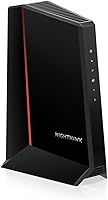
NETGEAR ships it with an Ethernet cable, a quick install guide and a power adapter. It measures 4.7 inches wide, 9.92 inches deep and 8.7 inches tall, and it weighs about 1 pound.
The black tower stands upright on a shelf or beside the router.
The Nighthawk name is NETGEAR's performance line, and this modem sits in it. The model number is CM2000 and the part number is CM2000-100NAS.
That second code is the one to quote to your cable provider when you check compatibility, since some reps search by part number rather than by the marketing name. For a closer look at the router side of that family, see the NETGEAR Nighthawk modem and router lineup.
Who should buy the NETGEAR CM2000?
Buy the CM2000 if you pay for a cable plan above 1Gbps and want to stop renting a modem. NETGEAR lists Xfinity, Spectrum and Cox as compatible providers for its 2.5 Gig port.
It also suits you if you already own a WiFi router with a 2.5G WAN port. That combination is what turns a multi-gig plan into multi-gig WiFi.
Without that port on the router, the modem runs fine but the extra speed stays at the modem.
Skip it in three cases. First, you're on a 1Gbps or slower plan and the port would be wasted.
Second, you need a modem with voice support for a bundled phone line. Third, you have fiber from Verizon or AT&T, DSL from CenturyLink, or satellite.
The CM2000 works with cable only and is made for use in the US.
It's also the wrong buy if you want one box that does WiFi and modem duty. That's a combo unit, not this.
Specs that matter in daily use
The headline spec is the 2.5 Gig Ethernet port, and it's the one that decides whether your plan's top speed reaches the router. A 1G port caps everything at 1Gbps, no matter what tier you pay for.
The modem runs DOCSIS 3.1 with 32x8 channel bonding and OFDM(A) 2x2. That's the current cable standard for tiers above 1Gbps.
The 32 downstream and 8 upstream channels are how the modem spreads your traffic across the provider's frequency band. NETGEAR also says it's backward compatible with DOCSIS 3.0, so a slower plan still works on it.
The single port is the practical limit. One router connects to the modem, and every device in the house goes through that router.
The modem itself doesn't create a network or hand out WiFi.
NETGEAR's claimed top speed is 2.5Gbps in both directions. Your provider decides the real number.
Xfinity, Spectrum and Cox sell tiers at different speeds, so the modem's ceiling matters only when your plan is close to it.
The size is modest for a multi-gig modem. At 4.7 inches wide, it fits on a narrow shelf.
Plan for the coax cable and the Ethernet run behind it. The case is ventilated, which matters more than the footprint because these units run warm when a plan pushes them hard.
Setting up the NETGEAR CM2000
Setup is connect, activate, then attach your router. Start by screwing the coax cable onto the modem's connector and plugging in the power adapter.
Wait for the lights to settle.
Next, activate the modem with your cable provider. You'll usually need the modem's model number and its MAC address, which is printed on the label.
NETGEAR's quick install guide covers the steps, and your provider's activation page or app walks you through the rest. Keep the power adapter on a surge protector while you do this.
Once the modem is online, run an Ethernet cable from its 2.5 Gig port to your router's WAN port. If your router has a 2.5G WAN port, use that one to keep full speed.
A router with only a 1G WAN port still works, just slower.
Then set up the router's WiFi name and password as usual. The modem has no wireless settings to configure.
Reboot the modem and router in that order if the connection doesn't come up.
If your provider's activation page asks for the old modem's details, keep the rented unit nearby until the new one is online. Return the rented modem once the CM2000 is working, so the fee stops.
NETGEAR's own estimate of up to 168 dollars a year in rental savings assumes a typical monthly fee, so the real figure follows whatever your bill shows.
For a deeper walkthrough, our cable modem setup guide covers activation and router pairing across providers.
Living with the CM2000: placement and care
Place the modem upright in the open, near the coax outlet. The black tower needs airflow, so don't bury it behind a TV stand or stack books on top of it.
Keep it off the floor where dust collects.
Leave room behind the unit for the coax and Ethernet cables. Bending the coax sharply at the connector can loosen it over time.
A gentle loop is enough. The single Ethernet port sits on the back panel next to the power input, so keep that end of the shelf reachable.
Wipe the case with a dry or slightly damp cloth now and then. Don't spray cleaner into the vents.
The lights on the front tell you power and connection status, so keep them visible. The power adapter is rated for 100 to 240 volts, so the modem travels with you without a converter, though the unit itself is made for US cable systems only.
Check the Ethernet cable once in a while. A loose plug at the 2.5 Gig port is the most common cause of a sudden speed drop.
Push it in until it clicks.
If your provider pushes a firmware update, the modem may reboot on its own. That's normal.
Leave it plugged in and let it finish. NETGEAR backs the modem with a 1-year warranty, so keep the receipt and the box until the first year is up.
Keep the box and the quick install guide. If you move house or switch providers, you'll want the model number and the activation steps handy.
The trade-offs before you buy
The CM2000's biggest limit is the single Ethernet port. One router connects and that's it.
If you want a separate wired device at the modem, you can't have one without a switch or router in between. Compare that with the ARRIS S33's two ports and the gap is clear.
There's no WiFi at all. That's expected for a modem, but it means the total cost includes a router if you don't own one.
A 2.5G-capable router costs more than a basic model.
Provider support is cable only. NETGEAR is clear that Verizon, AT&T, CenturyLink, DSL, DirecTV, DISH and bundled voice services don't work.
If you have fiber, this modem is the wrong category.
The 2.5Gbps ceiling is high, but few cable plans reach it. On a 1Gbps plan the port does nothing extra.
You're paying for headroom you won't use until you upgrade. The 32x8 channel bonding still helps on a crowded node, because more channels give the modem more room to move traffic around.
The score of 7.9 reflects that mix. The port and DOCSIS 3.1 specs are solid for multi-gig cable, but one port and no WiFi keep it behind more flexible rivals.
Alternatives worth a look
Two rivals compete directly with the CM2000. Both are modem-only DOCSIS 3.1 units with 2.5 Gig ports.
The choice comes down to price, port count and how much you trust each brand.
Hitron CODA56
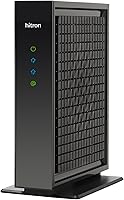
The Hitron CODA56 is the better pick for most multi-gig buyers, and its score of 8.5 leads this group. It has the same 2.5 Gig port and DOCSIS 3.1 support as the NETGEAR.
Hitron lists Xfinity up to 2.33Gbps, Spectrum at 1Gbps and Cox at 2Gbps as its fit. It's modem only, so you still need a router with a 2.5G port.
The CODA56 has no voice port and no WiFi. Hitron also spells out its activation path clearly, listing cable service, a router with a 2.5G port and ISP activation as the three things you need before setup starts.
The CODA56's upstream tops out at 700Mbps, which is plenty for most home uploads. NETGEAR lists 2.5Gbps in both directions.
On a plan with fast upload, the NETGEAR has more headroom on paper. Hitron also says the CODA56 is backward compatible with DOCSIS 3.0 networks, so the two units match there.
If you want the lowest price for a 2.5 Gig modem, the Hitron wins. If you want the Nighthawk name and a 1-year warranty from NETGEAR, the CM2000 stays in play.
For the full field, see our roundup of the best multi gig modem options.
ARRIS Surfboard S33
The ARRIS Surfboard S33 gives you two Ethernet ports, one at 2.5 Gig and one at 1 Gig. That second port is the feature the CM2000 lacks, and it scored 8.4 here.
ARRIS lists Charter, Comcast, Cox, Spectrum and Xfinity as compatible. The S33 supports plans up to 2.5Gbps and carries a 2-year limited warranty, longer than NETGEAR's 1 year.
It's modem only and needs a separate router for WiFi. ARRIS builds in simple LED indicators for power, upstream and downstream, and online status, which makes a connection fault easier to read than a single blinking light.
The S33's white case measures 5.25 by 1.8 by 5.24 inches. It's smaller than the CM2000 and easier to tuck onto a shelf.
The second port makes it the better fit if you want to wire one device straight to the modem.
The S33's 2.5 Gig port is the one to use for your router. The 1 Gig port suits a single wired device like a desktop or a game console.
That split is the reason to pick ARRIS over NETGEAR here. Our ARRIS vs NETGEAR modem comparison breaks down the brand differences in more detail.
Verdict: is the NETGEAR CM2000 worth it?
The NETGEAR CM2000 is a good modem for Xfinity or Cox multi-gig cable plans, and it does the core job well. The 2.5 Gig port and DOCSIS 3.1 specs are right for tiers above 1Gbps, and owning it ends the monthly rental fee.
It isn't the best value in this group. The Hitron CODA56 matches its port and standard for less, and the ARRIS S33 adds a second Ethernet port and a longer warranty.
Those two are the stronger buys for most readers.
Buy the CM2000 if you want the Nighthawk name and a modem that's proven across the big three cable providers. Buy the CODA56 if price decides it.
Pick the S33 if you need two wired ports.
One last check before you order. Confirm your plan speed and your provider, then confirm your router has a 2.5G WAN port.
Without that port, the CM2000's best feature sits idle. Our ARRIS Surfboard modem guide is the next stop if you're leaning toward the S33 instead.
Frequently asked questions
Does the NETGEAR CM2000 work with Xfinity?
Yes. NETGEAR lists Xfinity, Spectrum and Cox as compatible providers, and the CM2000 is built for their cable plans up to 2.5Gbps.
It won't work with Verizon, AT&T, CenturyLink, DSL, DirecTV or DISH, so confirm your internet type is cable before you order.
Is the NETGEAR CM2000 a modem only?
Yes. The CM2000 is a cable modem with a single 2.5 Gig Ethernet port and no WiFi radio.
You need your own WiFi router plugged into that port, and the router needs a 2.5G WAN port if you want full multi-gig speeds.
What router should I pair with the NETGEAR CM2000?
Any WiFi router works, but a model with a 2.5G WAN port is the only way to pass the modem's top speed to your wireless devices. A router capped at 1Gbps will run the CM2000 fine, just at slower speeds than your plan allows.
How much does the NETGEAR CM2000 save on rental fees?
NETGEAR says the CM2000 can save up to 168 dollars per year in cable modem rental fees. That figure depends on what your provider charges each month, so check your bill to compare the yearly cost against the modem's one-time price.
Do I need DOCSIS 3.1 for a multi-gig cable plan?
Yes. Cable providers use DOCSIS 3.1 to deliver tiers above 1Gbps, and the CM2000 supports it with 32x8 channel bonding and OFDM(A) 2x2.
It also works backward with DOCSIS 3.0 networks, so a slower plan still runs on it.