Hitron CODA56 Cable Modem Review: Worth It? (November 2026)
Buy the Hitron CODA56 if you have cable internet at 1 Gbps or faster and already own a WiFi router. It's a modem only with a 2.5 Gbps Ethernet port and DOCSIS 3.1 support up to 2.5 Gbps, so it pairs with Xfinity, Spectrum and Cox plans. Skip it if you need WiFi or have fiber, DSL or satellite.
On this page (8 sections)
The Hitron CODA56 is the right modem for cable internet plans at 1 Gbps and faster, as long as you already own a WiFi router. It's a modem only, with a 2.5 Gbps Ethernet port and DOCSIS 3.1 support for plans up to 2.5 Gbps.
If you need WiFi in the same box or you have fiber or DSL, this isn't the modem for you.
That split matters more than any single spec. A modem-only unit gives you a faster, cleaner path to your router, but you supply the router.
The CODA56 delivers on the speed side; the rest depends on your plan and your network gear. These Hitron CODA56 cable internet modem reviews cover the specs that decide whether it fits your home.
Hitron CODA56 at a glance
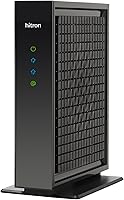
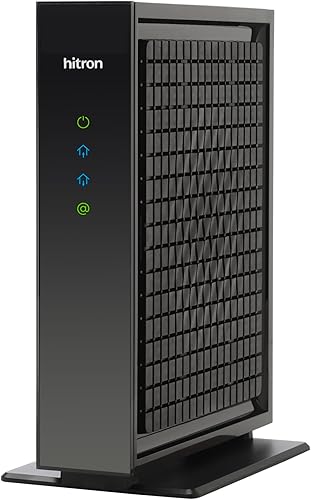
The CODA56 is a black, modem-only DOCSIS 3.1 unit built for multi-gig cable plans. Its headline feature is the 2.5 Gbps Ethernet port, which is what lets it keep up with Xfinity plans up to 2.33 Gbps, Cox Gigablast up to 2 Gbps and Spectrum at 1 Gbps.
Hitron CODA56: Best for multi-gig cable plans
- DOCSIS 3.1
- 2.5 Gbps Ethernet port
- Up to 2.5 Gbps plans
- Modem only, no WiFi
- Compatible with Xfinity, Spectrum, Cox
A modem-only DOCSIS 3.1 unit for cable plans at 1 Gbps and faster. It needs a separate router, so it fits households that already have one.
Pros
- 2.5 Gbps Ethernet port matches multi-gig plans
- DOCSIS 3.1 with backward compatibility for DOCSIS 3.0 networks
- Works with Xfinity, Spectrum and Cox
- Can replace a rented modem and its monthly fee
Cons
- No WiFi, so a separate router is required
- One Ethernet port only
- No voice port
- Not for fiber, DSL or satellite
It measures 7 in long, 1.77 in wide and 8.13 in tall and weighs 464 g, so it takes little shelf space next to a router. One Ethernet port and one coax connection keep the back panel simple.
The box includes the 2.5 Gbps Ethernet cable, a coax cable and the power supply.
Our score weighs specs, features and buyer feedback against what you're shopping for. At 8.5, the CODA56 earns its place for speed and provider coverage, with the missing WiFi and single port holding it back from a higher mark.
Hitron sells the CODA56 in three forms: a black modem, a white modem and a kit. The model on this page is the black unit, part number CODA56-S12B.
If you order the kit version instead, check what's inside it, because the kit may bundle different accessories than the plain modem.
Who the CODA56 suits, and who should skip it
Buy the CODA56 if your cable plan is 1 Gbps or faster and you already have a router with a 2.5 Gbps port. That combination is where the modem's speed actually reaches your devices, and it's also where dropping a rental modem fee pays off over time.
It also fits households that want to keep their own router and mesh system. Plugging the modem into the router's WAN port leaves your WiFi setup untouched, so you only swap the box between the coax outlet and the router.
Skip it in three clear cases. If you don't own a router, you'd get no WiFi at all from this unit.
If your internet comes from fiber, DSL, satellite or fixed wireless, the modem won't work. And if your plan is well below 1 Gbps, you'd be paying for headroom you can't use.
Renters and people in apartments should confirm the modem is allowed on their provider's approved list before ordering. Activation is handled by the ISP, not by the modem itself.
The specs that matter in daily use
The 2.5 Gbps Ethernet port and DOCSIS 3.1 support are the two specs that change your day-to-day experience. DOCSIS 3.1 also works on older DOCSIS 3.0 networks, so the modem won't be stranded if your provider hasn't upgraded everywhere yet.
Hitron rates the CODA56 for up to 2.5 Gbps downstream and 700 Mbps upstream. Those ceilings are what your provider's plan can push through, not a guarantee of speed; your plan tier and wiring set the real number.
The single Ethernet port is the practical limit to know. One cable goes to one router or one device.
If you plug a laptop straight into the modem, nothing else gets online until you add a router or switch.
Low latency matters for gaming, 4K streaming and video calls, and DOCSIS 3.1 helps there. The modem doesn't add WiFi processing, so the router you pair it with decides wireless performance.
The compatibility list is longer than the three big names. Hitron names Xfinity, Spectrum, Cox, Charter Spectrum, Cox Gigablast, Cable One Sparklight, Zito Media, Astound, Grande, RCN and Wave as compatible providers.
That's a wide net for a modem-only box, but the rule still holds that you confirm your exact plan and provider before ordering.
One caveat on the naming: the CODA56 is sold in black and white versions and as a kit. Check which variant you're getting, since the kit may bundle different accessories.
Setting up the CODA56
Setup is coax in, Ethernet out, then activate with your ISP. Connect the coax cable to the wall outlet and the modem, plug in the power supply and wait for the status lights to settle.
Run the 2.5 Gbps Ethernet cable from the modem to your router's WAN port. If your router's WAN port is gigabit only, the link will run at 1 Gbps, so the modem's full speed needs a matching port on the router side.
Then contact your provider to activate the modem on your account. Have the model number and the MAC address from the label ready.
Activation usually takes minutes, though some providers ask you to use their app or website.
Once the modem is online, test speed from a wired device first. That separates modem performance from WiFi performance and tells you whether the bottleneck sits in the router or the plan.
Your modem won't create a WiFi network, so set up the router's wireless name and password after activation. If you're replacing a rented gateway, remove it from the account or return it as your provider instructs.
Living with a modem-only unit
Day to day, the CODA56 sits quietly between your coax outlet and router and does one job. There's no WiFi to configure and no phone line, so the router carries the wireless setup and your home phone stays on its own gateway.
Placement matters more than you'd think. Keep the modem on a hard surface with airflow around it, away from heat and clutter.
Coax and power cables should reach without strain.
Caring for the unit is simple: wipe the case with a dry cloth, keep it off carpet and out of closed cabinets, and don't stack it directly on the router. The case is small and cool-running, so it needs little more than dusting.
If your internet drops, check the modem lights before rebooting the router. A lost coax signal shows up at the modem, while a WiFi problem shows up at the router.
That split makes troubleshooting faster.
If you want wired internet in a far room, the CODA56 alone won't get you there. A pair of MoCA adapters can push the connection over existing coax without new cable runs.
The modem's support line runs 7 days a week and Hitron backs it with a warranty; register the unit after setup so service is easier if something goes wrong. Hitron also has 30+ years in networking behind it, which is some reassurance if you've never bought a modem before.
Trade-offs to know before you buy
The biggest trade-off is no WiFi and no router built in. You supply both the wireless network and the routing, which is fine for people with existing gear but adds a purchase for anyone starting fresh.
The single Ethernet port is the second. A modem-only design keeps interference low and speed high, but you can't plug in several wired devices without a router or switch.
The third is provider fit. This modem is certified for cable providers like Xfinity, Spectrum and Cox.
It's not for Verizon FiOS, AT&T Fiber, CenturyLink DSL, HughesNet, Viasat or T-Mobile and Verizon Home Internet.
There's also no voice port, so it can't run a home phone line. Households with phone service bundled into their internet need to keep a separate telephone gateway or pick a different modem.
Finally, the 2.5 Gbps ceiling only matters on plans above 1 Gbps. On a slower plan, the speed advantage disappears and the value rests on dropping the rental fee instead.
If you need WiFi in the same box or have fiber, look elsewhere. A modem router combo covers both in one purchase.
Alternatives worth a look
The CODA56 is the fastest pick here, but it isn't the only sensible buy. These options fit different homes and plans.
For more context on matching a modem to your provider and speed tier, our cable modem buying guide walks through the decisions.
ARRIS for WiFi in one box
The ARRIS SBG10 is a DOCSIS 3.0 modem and AC1600 WiFi router in one unit. It tops out at 400 Mbps internet plans, so it suits budget cable plans where you'd rather not buy a separate router.
You get dual-band WiFi with coverage up to 1,400 sq ft, a gigabit LAN port and app setup with parental controls. Its score of 9.6 reflects how well it serves that budget audience.
If your plan is above 400 Mbps or you want multi-gig speed, the CODA56 is the better base.
Hitron MoCA adapters for wired rooms
The Hitron MoCA 2.5 Network Adapter 2-pack is not a modem, but it's the natural add-on if you keep the CODA56 and want wired internet in another room. It sends your existing connection over the coax outlets already in your walls.
Each adapter has a gigabit Ethernet port. It needs coax outlets connected through a main splitter, and cable users with a high-split DOCSIS 3.1 modem need a POE filter at the entry point.
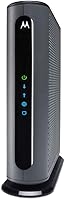
If a room also needs stronger WiFi, the pair can link mesh pods over coax instead of a weak wireless backhaul. Our Motorola MB8611 cable modem review covers another DOCSIS 3.1 option if you're comparing modems first.
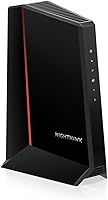
If your plan calls for a different brand or your provider prefers one, the ARRIS Surfboard modem lineup and the NETGEAR Nighthawk modem range are the other places to compare specs.
Verdict: should you buy the Hitron CODA56?
Yes, buy the CODA56 if you have cable internet at 1 Gbps or faster and already own a router with a 2.5 Gbps port. It matches multi-gig plans from Xfinity, Spectrum and Cox, works on older DOCSIS 3.0 networks and can replace a rented modem.
Choose the ARRIS combo instead if you want WiFi built in and your plan stays at 400 Mbps or below. Add the Hitron MoCA adapters if you keep the CODA56 and need a wired connection in a distant room.
Skip the CODA56 if you need WiFi in the same box, if you have fiber or DSL, or if your plan is well under 1 Gbps. These Hitron CODA56 cable internet modem reviews point to one conclusion: it's an excellent modem for the right cable household and the wrong buy for everyone else.
Frequently asked questions
Does the Hitron CODA56 have WiFi?
No. The CODA56 is a modem only, so it can't create a wireless network.
You need a separate WiFi router connected to its Ethernet port; without one, only a single device can connect by cable.
What internet speeds does the Hitron CODA56 support?
Hitron rates the CODA56 for cable plans up to 2.5 Gbps, with a 2.5 Gbps Ethernet port. Xfinity plans up to 2.33 Gbps, Spectrum at 1 Gbps and Cox Gigablast are the certified examples, so match the modem to your plan before buying.
Will the CODA56 work with fiber or DSL internet?
No. It only works with cable (DOCSIS) service such as Xfinity, Spectrum or Cox.
It won't work with Verizon FiOS, AT&T Fiber, CenturyLink DSL, satellite internet or fixed wireless services.
Do I need a special router to get full speed from the CODA56?
Yes. To reach multi-gig speeds you need a router with a 2.5 Gbps port, since a standard gigabit router caps the connection at 1 Gbps.
Check your router's WAN port before you buy the modem.
Can the CODA56 replace a rented modem?
It can, as long as your provider supports it and you activate it with your ISP. Owning the modem may remove a monthly rental fee; check the current fee with your provider and confirm the model is on its approved list first.
Does the CODA56 have a phone port?
No. The CODA56 has no voice port, so it can't run a home phone line.
If you need voice service, keep your provider's telephone gateway or look for a modem with a voice port instead.