Motorola MB8611 Cable Modem Review: Worth It? (November 2026)
The Motorola MB8611 is the right modem for most cable households on a gigabit-plus plan, thanks to its 2.5 GB Ethernet port and 2,500 Mbps downstream ceiling. Pick a different modem if you stay on plans under 1 Gbps or want four wired ports in one box.
On this page (8 sections)
The Motorola MB8611 is a strong choice for most cable households on a gigabit-plus plan, and it's the modem we'd point most readers to first. The 2.5 GB Ethernet port and stated downstream speed of just below 2,500 Mbps give fast routers room to breathe on Xfinity, Cox and Spectrum tiers.
This Motorola MB8611 cable modem review covers the specs that affect daily use, the setup steps, the care it needs and the trade-offs. By the end you'll know whether this is the box for your connection or whether a rival fits better.
The Motorola MB8611 at a glance
The MB8611 is a single-port DOCSIS 3.1 modem aimed at people with fast cable plans and their own router. Motorola ships it with a 2-year warranty and free support from US technicians.
Motorola MB8611: Best for most gigabit-plus homes
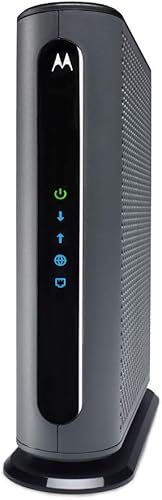
- 2.5 GB Ethernet port
- 2,500 Mbps max downstream
- DOCSIS 3.1 with 32x8 3.0 fallback
- 2-year warranty
A single-port modem built for fast cable plans, with a 2.5 GB Ethernet link and a 2-year warranty from Motorola.
Pros
- 2.5 GB Ethernet port matches fast routers
- Active Queue Management cuts latency
- 2-year warranty and US support
- Works with Xfinity, Cox and Spectrum
Cons
- Only one Ethernet port
- No WiFi or voice capability built in
Its black case measures 7.25 by 2.25 by 7.88 in, so it slips onto a shelf or the floor beside a router. The case is plain and the front panel is minimal, with no screen or antenna, which is what you want from a modem.
The label carries the model number MB8611 and the manufacturer part number MB861110, along with the MAC address your provider will ask for during activation. Keep that label reachable, because you'll read from it more than once.
Motorola has made home networking gear for over 40 years, and this model carries that reputation into a box aimed at high-speed cable tiers. The modem type is cable and the connectivity is Ethernet.
One port tells you the whole story: this box takes a coax feed in and hands one fast Ethernet link out. Nothing about it is decorative or complicated, which suits a device that lives out of sight behind a router.
Who the Motorola MB8611 suits
Buy the MB8611 if your cable plan runs at 1 Gbps or above and you already own a good router. It gives a fast router a fast WAN link, and it keeps you off monthly rental fees.
Motorola puts the typical saving at about 168 dollars a year on Comcast Xfinity, though the figure varies by provider. Households that game, take video calls or stream 4K on several screens will get the most from its Active Queue Management, which Motorola says cuts latency when the connection is busy.
Skip it if you're on a slower tier. A modem with a 2.5 GB port is wasted on a 300 Mbps plan, and a cheaper DOCSIS 3.0 model would do the same job.
Skip it too if you need WiFi or a phone line from one box, since the MB8611 is a modem only. Its upstream ceiling of 800 Mbps also needs a plan that supports it, so a household on a modest upload tier gains nothing from that figure either.
Renters who move between providers should check compatibility first. The MB8611 is approved for Comcast Xfinity, Cox Gigablast, Spectrum and RCN, and it's backward compatible with 32x8 DOCSIS 3.0 networks.
That fallback matters if your building or street hasn't been moved to DOCSIS 3.1 yet, because the modem still works on the older standard.
The specs that matter in daily use
The 2.5 GB Ethernet port is the headline, and it's the reason to pick this modem over a gigabit-only box. It feeds downstream speeds just below 2,500 Mbps and upstream speeds up to 800 Mbps when your plan supports them.
A 1 Gbps port caps a modem at 1,000 Mbps no matter how fast the plan is, so the 2.5 GB port keeps up with faster service. If your router's WAN port is only gigabit, the modem still works, but you'll want a router with a 2.5 Gbps port to see the full benefit.
The chip inside handles DOCSIS 3.1 while falling back to 32x8 channel bonding on older 3.0 networks. The 32 downstream and 8 upstream channels are the older bonding layout, and they give the modem a stable path on networks that haven't upgraded.
Active Queue Management is the second spec that shows up day to day. Bufferbloat, the lag that builds when a download saturates the line, is what AQM targets, and it helps with gaming and conferencing.
One Ethernet port is the limit. The MB8611 connects to one router or one computer, so wired devices go through the router, not the modem.
The cable modem buying guide explains how port speed, channel count and provider approval interact, which helps you match a modem to a plan.
Setting up the Motorola MB8611
Setup takes three connections: power, coax and Ethernet. Plug the power adapter in, screw the coax cable onto the port and run an Ethernet cable to your router's WAN port.
There's no software to install on the modem side. Then call or use your provider's app to activate it.
You'll need the model number and the MAC address printed on the label, and activation usually takes a few minutes. Your provider has to have the MB8611 on its approved list for your speed tier, so confirm that before you start.
Place the modem where air moves around it and away from heat. Screw the coax on finger-tight, then give it a small extra turn so it doesn't work loose.
A splitter between the wall and the modem adds another failure point, so keep the run as short and direct as you can. Power the modem before the router, and let the front lights settle before you test the connection.
If the modem won't come online, a loose coax fitting or a plan that doesn't list the MB8611 are the first things to rule out. A modem that activates but delivers slow speeds usually points to the plan tier or the router's port, not the modem itself.
Have your account number, the modem's serial number and the model number ready before you call. Motorola's support team can help if activation stalls, and the 2-year warranty runs from the date of purchase.
The DOCSIS 3.1 modem guide walks through what the newer standard changes for activation and speed.
Care and long-term use
Keep the vents clear and the coax tight. The MB8611 has no fan noise to worry about, but it still sheds heat through its case, so don't stack books or a router directly on top of it.
A little clearance on every side is enough.
Wipe the case with a dry cloth now and then. Dust on the vents is the main thing that builds up, and a soft brush clears it without opening the modem.
Never open the case, because there's nothing inside you can service and the warranty covers the hardware as shipped.
Leave the modem powered between sessions. Cycling it every day adds nothing, and a modem that stays online holds its connection to the provider.
If the connection does drop, a single restart is the usual first step, and then check the coax before anything else. Check the coax connector once a season, since a connector that's worked loose causes dropouts that look like provider faults.
The same applies after anyone moves furniture near the modem or vacuums behind it.
Motorola backs the MB8611 with a 2-year warranty from the date of purchase. Keep the receipt and the box label safe, since a claim needs the model number and serial.
If you move house, take the modem with you and reactivate it at the new address. Cable modems are tied to the provider's network, so a move to a fiber-only address means the MB8611 stays in the box.
The trade-offs to know before you buy
The single Ethernet port is the biggest limit. One 2.5 GB port is plenty for a router, but you can't plug a games console and a PC straight into the modem.
Everything wired has to go through the router, which is fine in most homes but worth knowing if your desk sits far from the router.
There's no WiFi and no phone capability. If you want one box to do everything, a gateway is simpler, though the MB8611 paired with a good router usually beats a rental gateway on speed.
A router is a required purchase, not an optional one. The 2.5 GB port also only pays off on fast plans.
On a 500 Mbps tier the modem works fine, but you're paying for headroom you won't use. The upstream ceiling of 800 Mbps has the same condition attached.
Stock varies by provider tier. Motorola asks buyers to check ISP compatibility by tier, and a modem that isn't on your provider's approved list won't activate.
The approved list also changes as providers certify new models, so check it close to your purchase date rather than relying on an old list. None of these are faults.
They're the price of a focused modem that does one job well, and for most people with their own router they're easy to live with.
Alternatives to the Motorola MB8611
Hitron CODA56
The Hitron CODA56 is the closest rival and a good second pick for cable plans up to 2.5 Gbps. It has the same 2.5 Gbps Ethernet port and DOCSIS 3.1 support, and Hitron lists Xfinity at up to 2.33 Gbps, Spectrum at 1 Gbps and Cox at 2 Gbps.
Its upstream ceiling is 700 Mbps, which sits a little below the MB8611's 800 Mbps.
Hitron says the CODA56 handles plans of 1 Gbps and faster and backs it with 7-day technical support. It's also modem only, so it needs the same separate router as the MB8611.
Hitron is blunt about the limits: no WiFi, no voice port and no fiber, DSL, satellite or fixed wireless support. It does list more cable providers than the Motorola, including Cable One Sparklight and Zito Media, so it's worth a look if your ISP isn't on Motorola's list.
Choose it if you want a second strong multi-gig option or your provider lists Hitron rather than Motorola. The NETGEAR Nighthawk modem overview and the ARRIS Surfboard modem overview cover the other brands if you want to compare lines.
NETGEAR Nighthawk CM1200
The NETGEAR Nighthawk CM1200 is the pick if you want four wired ports and link aggregation. Two 1G ports can combine into one 2G link, and it's built for plans up to 1 Gbps.
Its 2,000 Mbps downstream and 1,000 Mbps upstream ceilings sit behind that plan rating.
NETGEAR says it works with Xfinity, Spectrum and Cox and replaces a rental modem, and it carries a 1-year warranty. It also uses 32x8 channel bonding with OFDM 2x2 on DOCSIS 3.1.
Its 2,000 Mbps downstream and 1,000 Mbps upstream ceilings are lower than the MB8611's, but its port count is higher. NETGEAR notes the CM1200 won't work with Verizon, AT&T, CenturyLink or bundled voice service, so check that before you buy.
Choose it if wired devices sit near the modem. Choose the MB8611 if you want the fastest single link and a longer warranty.
The 2-year Motorola cover against the 1-year NETGEAR cover is a real difference if you plan to keep the modem for several years.
Verdict: should you buy the Motorola MB8611?
Buy the Motorola MB8611 if your cable plan is 1 Gbps or faster and you own a router. The 2.5 GB port, the 2,500 Mbps ceiling and the low-latency AQM make it the modem most readers should start with, and the 2-year warranty backs it up.
Its approved-provider list covers the big three cable names, and the 32x8 fallback keeps it useful on networks that haven't gone full DOCSIS 3.1.
Pick the Hitron CODA56 if you want another 2.5 Gbps modem and your provider lists it. Pick the NETGEAR Nighthawk CM1200 if four gigabit ports matter more than the fastest single link.
That's the short version of this motorola mb8611 cable modem review: it's the best fit for fast cable homes that want their own modem and a router they choose.
Frequently asked questions
Do I need a separate router with the Motorola MB8611?
Yes. The MB8611 is a modem only, so it has no WiFi radio.
You connect a WiFi router to its Ethernet port to get wireless internet.
Is the Motorola MB8611 compatible with Xfinity and Spectrum?
Motorola approves it for Comcast Xfinity, Cox Gigablast and Spectrum. Check that your provider lists the MB8611 for your exact speed tier before you buy.
Why does the MB8611 have only one Ethernet port?
Its single 2.5 GB port is meant to feed one router or computer. If you want several wired devices at the modem itself, the NETGEAR Nighthawk CM1200 has four gigabit ports.
Does the Motorola MB8611 have a voice port?
No. It handles internet only, so it won't replace a rental gateway that also runs a landline phone service.