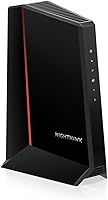
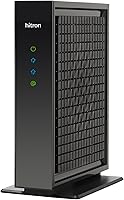
Hitron CODA56 vs ARRIS S34: Which to Buy? (November 2026)
The Hitron CODA56 wins for most people because it pairs a 2.5 Gbps port with 700 Mbps upstream and a 3-year warranty. Pick the ARRIS Surfboard S34 only if you need a second Ethernet port for a wired device or backup handoff.
On this page (5 sections)
The Hitron CODA56 is the better buy for most people. It hits the same 2.5 Gbps plan ceiling as the ARRIS Surfboard S34 but lists a 700 Mbps upstream rate and a 3-year warranty.
In the hitron coda56 vs arris s34 decision, the only strong reason to pick the ARRIS is its second Ethernet port.
Both are DOCSIS 3.1 cable modems built for plans at 1 Gbps and faster. Neither includes WiFi or voice, so you'll supply your own router either way.
That makes the choice about ports, upstream speed, warranty and how each modem fits your provider.
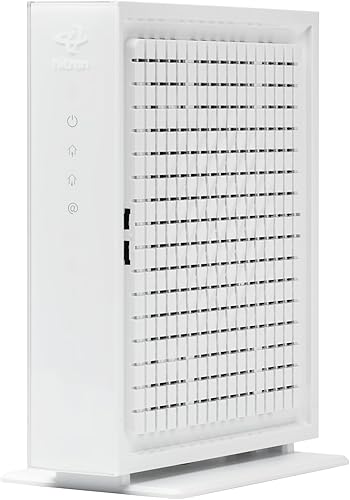

Hitron CODA56 vs ARRIS Surfboard S34: the quick verdict
Buy the CODA56 for the fastest plans and the longest coverage. The ARRIS S34 is the right call when a wired device needs its own port next to your router.
The CODA56 carries a 2.5 Gbps Ethernet port and supports internet plans up to 2.5 Gbps. Hitron lists 700 Mbps as its maximum upstream rate.
The Surfboard S34 matches the 2.5 Gbps downstream ceiling but adds a 1 Gbps port and lists 444 Mbps upstream.
Neither modem makes WiFi on its own. You'll connect a router to the Ethernet port, and the CODA56 needs a router with a 2.5 Gbps port to reach full speeds.
The S34's second port gives you a place for a gaming console or office PC without adding a switch.
Our comparison weighs each modem's ports, speed ratings, provider fit and warranty against what a multi-gig cable buyer wants. The CODA56's extra upstream headroom and longer warranty push it ahead for most homes.
The S34 stays in the running because its second port is a real hardware advantage, not a marketing line. If you know your setup needs that port, the gap between the two narrows quickly.
The 2 modems side by side
Both are modem-only units; the differences are in ports, speed ratings and warranty. Here's how the core specs line up.
| Product | Best for | Ethernet ports | Max plan speed | Warranty | Our score |
|---|---|---|---|---|---|
| Hitron CODA56 | multi-gig cable plans | 1 (2.5 Gbps) | 2.5 Gbps | 3 years | 9.0 |
| ARRIS Surfboard S34 | a wired device alongside WiFi | 2 (2.5 Gbps and 1 Gbps) | 2.5 Gbps | 2 years | 8.9 |
| Hitron CODA56 | black setups | 1 (2.5 Gbps) | 2.5 Gbps | See Hitron website | 8.5 |
The CODA56 gives you a single 2.5 Gbps port. The S34 gives you a 2.5 Gbps port for the router plus a 1 Gbps port for one more wired connection.
Both are DOCSIS 3.1 and backward compatible with older DOCSIS 3.0 networks. Only the CODA56 ships with an Ethernet cable, so the box contents don't change the decision.
The CODA56's kit also lists a coax cable.
Warranty is the quiet divider. Hitron includes a 1-year standard warranty plus a 2-year extended warranty for 3 years of coverage.
ARRIS provides a 2-year manufacturer warranty. Over a long ownership run, the extra year is worth something.
Hitron also lists technical support 7 days per week, while ARRIS points to its manufacturer coverage.
Ethernet ports and what they buy you
The CODA56's single port is enough for a standard router. If you want to plug in a desktop, NAS or console by wire, that device either goes through the router's LAN ports or you add a switch.
The S34's second port lets one device connect directly to the modem. ARRIS notes that this port's use depends on your service provider's configuration.
So treat it as a flexible extra, not a guaranteed second internet line. The second port runs at 1 Gbps, so a device there tops out at 1 Gbps even if your plan is faster.
That's fine for a console or a work PC, less so for a machine you want at multi-gig speed.
For most homes a router handles the wired devices anyway. The second port matters more in a small setup where the router sits near a single device you want wired.
If your desk and your modem share a shelf, the S34 saves you a switch. In a larger home with a central router, the port rarely gets used.
Upstream speed tiers
Download speed is no longer the whole story. Cable providers are rolling out faster upload tiers, and both modems list support for next-gen upstream.
ARRIS calls this out as a headline feature for the S34. Hitron frames it as part of the DOCSIS 3.1 package.
Hitron lists a 700 Mbps maximum upstream rate for the CODA56. ARRIS lists 444 Mbps for the S34.
The CODA56's figure gives more room if your provider later pushes upload speeds higher. The gap is about 256 Mbps on paper, which matters once providers sell upload tiers above 400 Mbps.
If your household runs cloud backups, uploads video, or makes constant video calls, the upstream headroom is the practical reason to favor the CODA56. The same applies to anyone who hosts a home server or works with large files all day.
A 444 Mbps ceiling is still generous for most homes today, but the CODA56 leaves more room for the tiers providers plan to sell.
Warranty and support coverage
Hitron includes 3 years of total warranty coverage on the white CODA56. It also offers technical support 7 days a week.
ARRIS covers the S34 for 2 years.
That extra year is the difference between replacing a failed modem on your own dime and getting it covered. It's a small detail until something goes wrong.
A modem typically runs for years without trouble, so the odds of using the third year are modest. Still, when two modems cost similar amounts and do similar jobs, the longer coverage is free insurance.
Hitron also makes product registration easy, which matters if you ever need to claim. Read the terms on the black CODA56 first, because its warranty runs through Hitron's website rather than a stated multi-year total.
Which modem fits your provider?
Both are certified for major cable providers, but only the CODA56 lists provider-specific speed ceilings in its data. Check your provider and plan before ordering.
Hitron lists the CODA56 as compatible with Xfinity up to 2.33 Gbps, Spectrum up to 1 Gbps and Cox up to 2 Gbps. ARRIS says the S34 is tested and qualified for Cox, Xfinity and Spectrum.
Both makers tell you to confirm device support with your provider, because approved modem lists change.
The CODA56's listed figures show where each provider's plans top out. If you're on Xfinity Gigabit X2 or a Cox multi-gig tier, the CODA56's 2.5 Gbps port covers those plans.
On Spectrum, both modems run well past the 1 Gbps ceiling Hitron lists. Hitron's compatibility list also names Astound, Grande, RCN, Wave and Zito Media, which widens its reach beyond the big three.
For Xfinity homes
Xfinity offers some of the fastest cable plans, so the modem's port and upstream rating matter. The CODA56's 2.5 Gbps port and 700 Mbps upstream give you more headroom on the top tiers.
Hitron lists Xfinity at up to 2.33 Gbps, just under the port's ceiling. Our guide to Xfinity compatible modems lists the models that qualify and what to check.
The S34's 2.5 Gbps port also covers Xfinity's fastest cable tiers. Its advantage here is the second port, which you could use for a wired device at the modem.
Its lower upstream rating is the tradeoff on upload-heavy plans.
For Spectrum homes
Spectrum plans at 1 Gbps sit well within both modems' reach. The CODA56 lists Spectrum at 1 Gbps, and the S34's 2.5 Gbps port covers it too.
Neither modem includes voice, so keep that in mind if you rely on a Spectrum phone line. See our roundup of Spectrum approved modems for models that fit voice and WiFi needs.
On a 1 Gbps plan, neither modem's port is the limit. The choice comes down to warranty and the extra port rather than speed.
The CODA56's upstream rating still gives it more room if Spectrum raises upload speeds later.
For Cox and other cable providers
Cox plans up to 2 Gbps fit the CODA56's listed ceiling. The S34's second port can be handy if Cox configures it for a backup handoff.
Hitron also lists Cox Gigablast and Cable One Sparklight among the providers the black CODA56 works with. Astound, Grande, RCN, Wave and Zito Media appear in the CODA56's compatibility list as well.
None of these modems work on fiber, DSL or satellite. Confirm your home gets cable internet, not a fiber service from the same brand, before you buy.
Hitron spells this out plainly: the CODA56 will not work with Verizon FiOS, AT&T Fiber, Google Fiber, DSL, satellite or 5G home internet. The same limit applies to the S34, which ARRIS says is not compatible with fiber, DSL or satellite services.
Which one wins on setup and home network fit?
The S34 is the slightly easier fit for a wired-heavy desk setup; the CODA56 asks more of your router. Setup steps are nearly the same for both.
You connect the coax, power on, and call your provider to activate the modem. Then you connect a WiFi router to the Ethernet port.
The CODA56 needs a router with a 2.5 Gbps port for full speeds. Without a router, only one device connects to its single port.
The S34 gives you a 2.5 Gbps port for the router plus a 1 Gbps port for one wired device. That's useful when a gaming console or work PC sits next to the modem and you'd rather not buy a switch.
Who should buy the Hitron CODA56?
Buy the CODA56 if you're on a 1 Gbps or faster cable plan and want the longest warranty. It's the pick for gamers and streamers who want low latency and room for faster upload tiers later.
Hitron's product data stresses low latency for 4K streaming, gaming and video calls, and the 700 Mbps upstream rating backs that up.
It also suits anyone replacing a rental modem to cut the monthly fee. Hitron's 3-year coverage means you'll likely get years of use before worrying about a replacement.
The single port is no problem if your router handles all your devices.
Skip it if you need several wired connections at the modem without a router or switch. The single port can't do that.
Who should buy the ARRIS Surfboard S34?
Buy the S34 if one wired device needs a direct connection and you still want a 2.5 Gbps port for the router. The extra port is its clear edge over the CODA56.
ARRIS lists the S34's compact design and simple LED indicators for power, upstream, downstream and online status as part of the appeal. At roughly 10.55 by 6.75 by 2.46 inches, it's a flat cabinet that tucks onto a shelf more easily than a tall modem.
It's also CableLabs certified and tested for Cox, Xfinity and Spectrum, which gives you confidence on the big three. The 2-year warranty is shorter but still solid.
Skip it if warranty length or upstream headroom is your top priority. The CODA56 wins both.
What about the second CODA56 model?
The black CODA56 is the same modem hardware in a different finish. It lists the same 2.5 Gbps port, same 2.5 Gbps plan ceiling and same 700 Mbps upstream rate.
The white version includes 3 years of coverage. The black version points to Hitron's website for warranty terms, so read those before buying.
If the color matters and you're comfortable with Hitron's site-based coverage, the black model works fine. Otherwise the white CODA56's 3-year warranty is the safer buy.
Both CODA56 units are cable-only, so the fiber warning applies to either one.
A note on the ARRIS Surfboard S33
If you're weighing ARRIS options, the ARRIS Surfboard S33 review covers the older sibling. It's worth a look if you want an ARRIS modem but don't need the S34's second port.
For a direct look at the CODA56 against the S33, see our ARRIS S33 vs Hitron CODA56 comparison.
Which should you buy?
Buy the Hitron CODA56 for most multi-gig cable homes. Its 2.5 Gbps port, 700 Mbps upstream rating and 3-year warranty make it the stronger all-round modem in this hitron coda56 vs arris s34 matchup.
Pair it with a router that has a 2.5 Gbps port to get full speeds.
Hitron's 30+ years in networking and 7-day support add to the case.
Choose the ARRIS Surfboard S34 only when the second Ethernet port solves a real problem for you. A direct wired connection for a console or PC next to the modem is a fair reason to give up the extra warranty year and the higher upstream rating.
Its compact shape also helps if space is tight.
Check three things before you order either modem: that your service is cable internet rather than fiber, that your plan is 1 Gbps or faster, and that your provider supports customer-owned modems. If you own the modem and skip the rental fee, either one can pay for itself over time.
On a 1 Gbps plan with a standard router and no wired extras, the CODA56 is the simpler, better-covered pick. On a desk setup that needs one more Ethernet jack, the S34 earns its place.
Frequently asked questions
Is the Hitron CODA56 compatible with Xfinity and Spectrum?
Hitron says the CODA56 works with Xfinity plans up to 2.33 Gbps, Spectrum plans up to 1 Gbps and Cox plans up to 2 Gbps. Confirm your provider supports customer-owned modems before you switch from a rental.
Do I need a separate router with either modem?
Yes. Both the CODA56 and the Surfboard S34 are modem-only units with no WiFi, so you'll add a WiFi router.
For full CODA56 speeds, the router needs a 2.5 Gbps port.
Which modem is better for upload-heavy use?
The CODA56 lists a 700 Mbps maximum upstream rate, while the S34 lists 444 Mbps. If your plan pushes a lot of data up, as with cloud backups or live streaming, the CODA56 has more headroom.
What is the difference between the two Hitron CODA56 models here?
The white version includes a 3-year warranty through Hitron's extended coverage. The black version lists warranty coverage through Hitron's website, so read the terms before you buy.