NETGEAR Nighthawk CAX30S Review: Worth It? (November 2026)
The NETGEAR Nighthawk CAX30S is a good buy if your cable provider is Xfinity, Spectrum or Cox and you want one box for a DOCSIS 3.1 modem and WiFi 6. Pick the CAX30 instead if upstream speed matters more, and skip both for fiber providers.
On this page (9 sections)
The NETGEAR Nighthawk CAX30S is a solid buy for cable households on Xfinity, Spectrum or Cox that want a modem and WiFi 6 router in one box. It covers a typical home and handles a full family's devices without a second appliance.
This NETGEAR CAX30S review weighs its specs against the plans it supports and the alternatives that fit better.
The headline is convenience: one device, one app and full control over your WiFi settings. The catch is a speed ceiling on Xfinity and a hard no for fiber and voice plans.
If either applies to you, the alternatives below are the better spend.
The NETGEAR CAX30S at a glance
The CAX30S puts a DOCSIS 3.1 cable modem and a dual-band WiFi 6 router in one chassis. That combination is the reason to buy it: fewer boxes, fewer cables and one place to manage everything from your WiFi name to guest networks.
NETGEAR Nighthawk CAX30S: Best for Xfinity plans up to 800Mbps
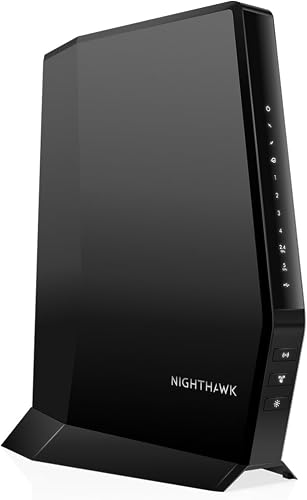
- DOCSIS 3.1 modem and WiFi 6 router in one
- Dual-band AX2700, up to 2,000 sq ft
- Four Gigabit Ethernet ports
- WPA3 encryption and Nighthawk app setup
A two-in-one cable modem and WiFi 6 router for US cable homes that want one device and full control over their network settings. Its 800Mbps Xfinity ceiling and voice-plan limits are the main reasons to look elsewhere.
Pros
- Modem and router in a single device
- DOCSIS 3.1 with OFDMA for steadier peak-hour speeds
- WiFi 6 coverage rated to 2,000 sq ft for 25+ devices
- WPA3 encryption, firewall and denial-of-service protection built in
- Free Nighthawk app for setup and network control
Cons
- Xfinity plans are capped at 800Mbps
- Not compatible with Verizon, AT&T, CenturyLink, DirecTV, DISH or bundled voice plans
- A separate modem and router gives more upgrade flexibility
NETGEAR rates the WiFi side at AX2700 with coverage up to 2,000 sq ft and capacity for 25 or more connected devices. Real coverage depends on your home's size, layout and building materials, so a thick-walled house may need more than the headline figure suggests.
The modem side supports Gigabit+ cable plans through DOCSIS 3.1. That means large downloads, 4K streaming, gaming and video calls can run at the same time without the connection falling over itself.
Actual speeds still depend on the plan you buy and what your provider delivers.
Our score of 7.8 weighs specs, features and buyer feedback against what you're shopping for. It's a capable combo, but the provider limits and the older sibling below keep it short of the top of this category.
Who the CAX30S suits
Buy the CAX30S if you have Xfinity up to 800Mbps, Spectrum up to 1Gbps or Cox up to 1Gbps and want to stop renting a modem. It also makes sense if your current router is aging and you'd rather replace two devices with one.
It fits a family home where phones, laptops, a smart TV and a handful of smart home gadgets all share the connection. The 2,000 sq ft rating and 25+ device capacity line up with that kind of household.
Skip it if you're on fiber with Verizon, AT&T or CenturyLink. The CAX30S is made for US cable internet only, so it won't work on those networks at all.
Skip it too if your Xfinity plan runs faster than 800Mbps, since the modem would hold your speed back.
Skip it if you pay for a bundled voice plan. NETGEAR lists voice bundles as incompatible, so keep your provider's phone setup separate if you need one.
Specs that matter in daily use
The four Gigabit Ethernet ports are the spec you'll notice most. They let you hardwire a gaming console, a desktop and a streaming box for the lowest latency and the most stable connection in the house.
WiFi handles the phones and laptops; the ports handle the devices that care about ping.
WiFi 6 with dual-band AX2700 keeps the wireless side current. Newer phones and laptops can use the WiFi 6 improvements, while older devices still connect on the same network.
Coverage is rated to 2,000 sq ft, which is roughly a two-story home or a large single floor.
DOCSIS 3.1 with OFDMA is the quiet upgrade. It improves response times when the neighborhood is busy, so speeds hold steadier during peak hours when everyone is streaming at once.
That matters more than a big number on a box.
The 800Mbps Xfinity ceiling and 1Gbps Spectrum and Cox limits are the numbers to check before you buy. Match the combo to your plan, not above it.
Setting up the CAX30S
Setup runs through the free Nighthawk app on iOS or Android, with a browser option if you prefer. Download the app, follow the guided steps, then activate the modem with your internet provider.
NETGEAR notes that ISP activation is required after setup.
Before you start, have your provider account details handy. Activation usually means giving the provider the modem's identity so it can be provisioned on your plan.
Do that before you judge the WiFi, because an inactive modem gives you nothing to test.
Once you're online, use the app to set your WiFi name and password, run a speed test and set up a guest network. You can also pause devices from the app, which is handy for managing kids' screen time without logging into a web interface.
Keep the box and paperwork until activation is confirmed. If the provider needs a detail from the label, it's easier to find on the device than in an email.
Living with it day to day
Day to day, the CAX30S is a set-and-forget box for most homes. You set the WiFi once and manage occasional changes from the app.
Speed tests, guest networks and device pausing all live in the same place.
The wired ports reward a little planning. Put the console and desktop on Ethernet and leave WiFi for phones and tablets.
That split keeps latency low for gaming and frees wireless capacity for everyone else.
WPA3 encryption, firewall protection and denial-of-service attack prevention are built in. WPA3 is the newer WiFi security standard, and it's worth switching on if all your devices support it.
Older devices may need WPA2, so check before you change the setting.
NETGEAR Armor adds enhanced protection against hackers, malware and identity theft, with a 90-day free trial. It's optional, and continuing after the trial needs a separate subscription.
Decide whether that's worth it to you rather than leaving it on by default.
Care and maintenance
Keeping the CAX30S cool and clear is most of the care it needs. Give it open air around the vents and don't stack it under other equipment or inside a closed cabinet.
Heat is the main enemy of any modem-router combo.
Dust the vents now and then with a dry cloth. A unit that runs hot and sits in dust works harder than it should.
Restart it if the connection drops before you call your provider. A simple power cycle clears most temporary glitches, and it's the first thing support will ask you to try.
Keep the firmware current. NETGEAR pushes updates through the app and the web interface, and those updates carry security fixes as well as performance tweaks.
Let them install when prompted.
If you move house or change providers, check compatibility again before you plug it in. The CAX30S is tied to cable networks, so a move to fiber means a new router.
Trade-offs to weigh before buying
The biggest trade-off is the Xfinity speed ceiling. NETGEAR rates the CAX30S for Xfinity plans up to 800Mbps, so if you're on a Gigabit Xfinity tier, the modem caps what you can actually use.
Spectrum and Cox top out at 1Gbps.
The second is provider lock-in. It works only on US cable internet, so Verizon, AT&T, CenturyLink, DirecTV and DISH are all out.
Bundled voice plans are out too. Check your provider and plan before you order.
The third is flexibility. A combo ties your modem and router together, so upgrading one means replacing both.
Separate units cost more upfront but let you swap the router when WiFi standards move on.
The fourth is coverage. The 2,000 sq ft rating is a NETGEAR figure and real homes vary.
A long, thin house or one with thick interior walls may leave corners weak, and a mesh system would serve better there.
How the CAX30S compares with the alternatives
The CAX30S has close siblings and one strong rival in this category. Each fits a slightly different buyer, so match the pick to your plan and home.
NETGEAR Nighthawk CAX30
The CAX30 is the same combo with a higher upstream rating, and it's the better buy if upload speed matters to you. It carries the same DOCSIS 3.1 modem, WiFi 6 coverage and four Gigabit ports, so the day-to-day experience is close.
NETGEAR rates its upstream data transfer at 1Gbps against the CAX30S's 800Mbps. If you work from home, upload video or back up large files, that headroom is worth having.
Our NETGEAR Nighthawk CAX30 review covers the differences in detail. For most buyers choosing between the two, the CAX30 edges ahead.
ARRIS SURFboard SBG10
The ARRIS SBG10 is the budget-friendly option here. It pairs a DOCSIS 3.0 16x4 modem with AC1600 WiFi, so it's older technology and rated for lower internet speeds.
ARRIS puts its max at 400Mbps.
That makes it a fit for households on basic or mid-tier cable plans who don't need Gigabit speeds. It won't keep up with a fast Xfinity or Spectrum plan the way the CAX30S will.
If your plan is 400Mbps or below, the ARRIS saves money without leaving speed on the table. Our CAX30 vs ARRIS G34 comparison looks at how the NETGEAR and ARRIS families stack up.
NETGEAR Nighthawk CM3000
The CM3000 is a modem only, so it's for buyers who already have a router they like or plan to buy a better one. You supply the WiFi, and you get a dedicated modem that's easier to upgrade separately.
Wait, that's the CAX30. Let me correct that: the CM3000 is the separate modem route.
Choose it when you want to pair a strong modem with your own router, or when you want the flexibility to swap the WiFi side later. Our NETGEAR Nighthawk CM3000 review explains what it offers.
If you'd rather have one box and one app, the CAX30S is the simpler path. Browse the full NETGEAR Nighthawk modem lineup if you're still deciding between combo and modem-only.
Verdict: should you buy the NETGEAR CAX30S?
Buy the CAX30S if you're on Xfinity up to 800Mbps, Spectrum or Cox and want a single device that handles your modem and WiFi 6. It covers a typical home, hardwires your fastest devices and gives you app control over the network.
That's a practical, tidy setup for most cable households.
Skip it if you're on fiber or a bundled voice plan, or if your Xfinity plan runs faster than 800Mbps. In those cases the modem simply isn't the right fit.
Pick the CAX30 instead if upload speed matters, and pick a separate modem and router if you want to upgrade each piece on its own schedule.
For everyone else, this NETGEAR CAX30S review lands on a straightforward recommendation: it's a good combo for the right cable home, and the provider limits are the only thing standing between it and a higher score.
Frequently asked questions
Is the NETGEAR CAX30S a modem and router in one?
Yes. The CAX30S combines a DOCSIS 3.1 cable modem with a dual-band WiFi 6 router in a single unit.
You connect it to your cable line, activate it with your provider, and it handles both the internet connection and your home WiFi.
Does the NETGEAR CAX30S work with Xfinity?
Yes, NETGEAR says it works with Xfinity internet plans up to 800Mbps. Xfinity customers on faster tiers should look at a combo rated for higher speeds.
ISP activation is required after setup, and bundled voice plans are not supported.
Can I use the CAX30S with fiber internet?
No. The CAX30S is made for US cable internet only and is not compatible with Verizon, AT&T or CenturyLink.
If you have fiber, keep the provider's ONT and add a separate WiFi router rather than buying a cable modem combo.
How many devices can the NETGEAR CAX30S handle?
NETGEAR rates the CAX30S for 25 or more connected devices across up to 2,000 sq ft. That suits a typical family home with phones, laptops, a smart TV and smart home gear.
Very large homes or dozens of devices may need a mesh system.
Does the CAX30S include security features?
Yes. It has WPA3 WiFi encryption, firewall protection and denial-of-service attack prevention built in.
NETGEAR Armor adds enhanced protection against hackers, malware and identity theft through a 90-day free trial, with a separate subscription needed to continue.