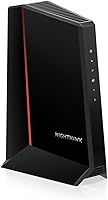
Is NETGEAR a Modem?
Yes, NETGEAR is a modem maker. Its Nighthawk line includes standalone DOCSIS 3.1 cable modems that plug into your coax and connect to a router, so the modem and the WiFi are two separate devices you can buy and upgrade on their own schedule.
On this page (7 sections)
- Does NETGEAR make cable modems for home internet?
- Why do people confuse NETGEAR modems with routers?
- How can you tell a NETGEAR modem from a router?
- Which NETGEAR Nighthawk modem fits your plan?
- Do you need a router with a NETGEAR modem?
- What do the lights on a NETGEAR modem mean?
- Is NETGEAR a modem brand worth choosing?
Yes, NETGEAR is a modem brand. The company makes standalone DOCSIS 3.1 cable modems under its Nighthawk line, along with separate routers, mesh systems and all-in-one modem-router combos.
So when you ask is NETGEAR a modem, the short answer is that it makes modems and the WiFi gear that goes with them, as two separate products.
That split matters when you shop. A NETGEAR cable modem handles the coax connection to your provider, and a router spreads WiFi through the house.
Buy each one on its own cycle, and you replace only the part that goes out of date.
Does NETGEAR make cable modems for home internet?
Yes. NETGEAR builds standalone cable modems that use DOCSIS, the standard US cable providers run on, and the Nighthawk CM1000, CM2500 and CM3000 are the current examples.
Each one has a coax fitting, an Ethernet port for a router, and no WiFi radio inside.
The company also sells all-in-one modem-router combos, where the modem and WiFi live in one box. Those are convenient for a small home, but when the WiFi ages you replace the whole unit.
A standalone modem costs less to keep through several WiFi upgrades.
NETGEAR says its cable modems are certified by the FCC for use in the United States. They are made for US cable internet only, so fiber and DSL homes need different equipment.
Each Nighthawk modem in this line also ships with the basics in the box: the modem itself, one Ethernet cable, a power adapter and a quick start guide. You supply the router and the coax cable from the wall.
The modem's job is narrow by design. It takes the cable signal from your provider and hands a clean Ethernet connection to whatever router you connect.
It doesn't broadcast WiFi, doesn't run a guest network and doesn't manage your devices. That's the router's work.
Why do people confuse NETGEAR modems with routers?
The confusion usually comes from the box. A NETGEAR modem-router combo is one device that does both jobs, and plenty of homes have one from their provider or from a store shelf.
When that single box sits under the TV, it's easy to treat NETGEAR as a router brand or a modem brand, when it's both.
NETGEAR names both halves Nighthawk, so the modem, the router and the combo share a family name. A shopper looking for "a Nighthawk" may land on the wrong type of box entirely.
The word "Nighthawk" describes a product family, not a single type of device.
The fix is to read what the device does, not the name. A modem has a coax port and no WiFi antenna.
A router has Ethernet ports for your devices and no coax input. A combo has both.
The specs settle it fast: look for "modem type: cable" for a modem, and for a WiFi standard or antenna count for a router.
How can you tell a NETGEAR modem from a router?
Look at the back panel first. A modem has a threaded coax connector for the cable line, and a router doesn't.
A standalone modem also has no WiFi antennas and no wireless settings screen.
- Coax port plus one or two Ethernet ports: a standalone cable modem.
- Ethernet WAN port plus four LAN ports and antennas: a router or mesh unit.
- Coax port plus antennas and LAN ports: a modem-router combo.
The model name helps too. Nighthawk CM models are cable modems, and Nighthawk RA or mesh models are routers.
If a device shows both a coax input and WiFi, you're looking at a combo.
The port count also tells you what the modem expects. The CM1000 has a single Gigabit port, so it feeds one router or one computer.
The CM2500 and CM3000 each carry two Ethernet ports, which lets a compatible router combine both links or leaves a spare port open. None of the three has a WiFi radio, so none of them can replace a router on its own.
Which NETGEAR Nighthawk modem fits your plan?
Match the modem's ceiling to your cable plan, then choose the box. The CM3000 has the highest speed rating here, the CM2500 sits one step below, and the CM1000 covers Gigabit plans.
Each is a modem only, so you add your own router.
All three work with Xfinity, Spectrum, Cox and most US cable providers on the right plan. All three are also built around DOCSIS 3.1 features like OFDMA and Active Queue Management, which keep speeds steadier during peak-hour congestion when the whole household is online.
The difference between them is the speed ceiling and the port layout.
Best for multi-gig cable plans
The NETGEAR Nighthawk CM3000 is the pick when your provider sells plans above 2 Gbps. It tops out at 2.5 Gbps download with a 2.5 Gig Ethernet port for a compatible router, or you can combine its two 1 Gig ports for up to 2 Gbps.
The Nighthawk app walks you through setup and firmware updates.
One catch: NETGEAR rates this model for plans up to 2 Gbps, even though the hardware reaches 2.5 Gbps. Your provider's approved-plan list decides.
If you plan to upgrade WiFi separately, our roundup of the best NETGEAR Nighthawk cable modems compares the full line.
Best for plans up to 2 Gbps
The NETGEAR Nighthawk CM2500 suits most multi-gig households. It handles 2 Gbps down and 1 Gbps up, and its two Gigabit ports can combine through link aggregation for 2 Gbps to a matching router.
DOCSIS 3.1 queue management keeps speeds steadier when the whole family is online.
Both this modem and the CM3000 want a mid-split or high-split cable network to hit their upload ceiling. Check your provider's plan page for that detail before ordering.
Best for standard Gigabit plans
The NETGEAR Nighthawk CM1000 is the simple choice for a 1 Gbps cable plan. It reaches 1 Gbps down with a single Gigabit port, and it works on both DOCSIS 3.0 and 3.1 networks, so it's ready when your provider upgrades.
Setup runs through a browser or a short call to your provider.
Check the plan details before you buy. NETGEAR rates it for Xfinity plans up to 800 Mbps, and for Spectrum and Cox up to 1 Gbps.
Its single port means no link aggregation, so the modem's Ethernet ceiling is 1 Gbps no matter what plan you buy. That's the right amount for a Gigabit household and the wrong amount for a multi-gig one.
Do you need a router with a NETGEAR modem?
Yes, unless you bought a combo. A standalone NETGEAR cable modem has no WiFi, so without a router you get one wired connection and nothing else.
The modem talks to your provider, and the router turns that connection into WiFi and extra Ethernet ports.
The hookup is short: coax into the modem, Ethernet from the modem to the router's WAN port, then power both on. Our guide on how to connect a modem to router walks through the order and the settings.
You'll also need to activate the modem with your cable provider before it goes online.
Any brand of router works, not just NETGEAR. If you're weighing brands, the question of does ASUS make modems comes up often, and the answer shapes whether you buy a modem and router from one company or mix them.
Either way, the modem's Ethernet port is the only handoff you need to think about.
What do the lights on a NETGEAR modem mean?
The lights tell you where the connection stands, and reading them saves a support call. A solid power light and a solid or blinking online light mean the modem has a signal; a dark or red light points to a problem.
The coax and Ethernet lights confirm each link separately.
A blinking online light during boot is normal. If it keeps blinking after a few minutes, the modem likely isn't activated or the line has a signal issue.
Our guide to modem lights blinking explains each pattern on cable modems. A dark Ethernet light with the router connected usually means a loose cable or a dead port, not a provider outage.
Is NETGEAR a modem brand worth choosing?
Yes, for cable homes. NETGEAR is one of the main retail brands for standalone cable modems, and the Nighthawk CM1000, CM2500 and CM3000 cover 1 Gbps, 2 Gbps and 2.5 Gbps cable plans.
Buying the modem by itself keeps your WiFi free to change.
The app support matters too. NETGEAR's free Nighthawk app on iOS and Android handles guided setup, modem status checks, speed tests and firmware updates, and the modem also sets up through a web browser if you prefer.
Automatic firmware updates keep the modem secure without you chasing downloads. NETGEAR also offers free expert help if activation stalls.
Pick the CM3000 for a multi-gig plan, the CM2500 for a 2 Gbps setup, or the CM1000 for standard Gigabit service. Then add any router you like.
Before you order, check that your provider approves the exact model and that your service is cable, not fiber or DSL. That one check decides whether a NETGEAR modem will work in your home at all.
And skip the cable modems for Verizon, AT&T, CenturyLink, DirecTV and DISH, along with bundled voice plans, since those services don't run on the coax these boxes expect.
Frequently asked questions
Can I use a NETGEAR modem with my own router?
Yes. NETGEAR's standalone cable modems have Ethernet ports for a router, so you can pair one with any WiFi router or mesh system.
That setup lets you upgrade WiFi without replacing the modem later, and you activate the modem with your cable provider first.
Does a NETGEAR modem work with Verizon or AT&T?
No. NETGEAR's cable modems are made for US cable internet, such as Xfinity, Spectrum and Cox.
They don't work with fiber or DSL services like Verizon, AT&T or CenturyLink, and they aren't compatible with bundled voice plans.
Is a NETGEAR modem the same as a Nighthawk modem?
Nighthawk is NETGEAR's brand for its faster home networking gear, including the CM1000, CM2500 and CM3000 cable modems. Some other NETGEAR modems sold for cable providers use the NETGEAR name without Nighthawk, but they do the same modem job.
Do I need a NETGEAR modem and a router to get WiFi?
A standalone modem gives you a wired internet connection only. For WiFi you add a router, connecting it to the modem with an Ethernet cable.
NETGEAR also sells modem-router combos, which put the modem and WiFi in one box but limit you to that one WiFi system.
What speeds do NETGEAR cable modems support?
It depends on the model. The Nighthawk CM1000 handles plans up to 1 Gbps, the CM2500 up to 2 Gbps and the CM3000 up to 2.5 Gbps download.
Match the modem to your plan, and confirm with your provider that the model is approved.