7 Best Modem Router Combos for Cox (October 2026)
The best modem router combos for Cox include the ARRIS Surfboard G34 for most Cox homes, the ARRIS Surfboard G36 for multi-gig plans, and the ARRIS Surfboard G54 for Wi-Fi 7.
On this page (4 sections)
The ARRIS Surfboard G34 is the best modem router combo for Cox for most homes, with DOCSIS 3.1, Wi-Fi 6 and four Gigabit Ethernet ports. The Orbi CBK752 suits homes needing a mesh satellite, while the G54 adds Wi-Fi 7 and a 10 Gigabit port.
Cox compatibility depends on the exact modem model and plan. Before choosing a combo, check the Cox approved modem list and confirm that Cox can activate the model on your account.
Our picks at a glance
-
1

-
2

-
3

Which modem router combo is best for Cox?
The G34 is the strongest all-around pick here because it combines a DOCSIS 3.1 modem, AX3000 Wi-Fi 6 and four wired ports. The other models stand out for mesh coverage, a 2.5 GbE or 10 GbE port, or a simpler Wi-Fi setup.
ARRIS Surfboard G34: Best for most Cox homes
- DOCSIS 3.1
- Dual-band Wi-Fi 6 AX3000
- Four Gigabit Ethernet ports
- Up to 2,500 sq ft coverage
A balanced option for Cox households that want a DOCSIS 3.1 modem and Wi-Fi 6 router in one unit. ARRIS says it is qualified for Cox, though you should confirm support for your exact plan.
Pros
- DOCSIS 3.1
- Four wired Gigabit ports
- Wi-Fi 6 coverage up to 2,500 sq ft
Cons
- Not for fiber, DSL or satellite
- Confirm model support with Cox
The G34 gives you a modem and router in one unit, with dual-band Wi-Fi 6 rated up to 3 Gbps wireless performance. ARRIS states coverage up to 2,500 sq ft, though walls and room layout affect how far Wi-Fi reaches in your home.
Its four 1 Gigabit Ethernet ports make it easier to wire a TV, game console or desktop without adding a separate switch. ARRIS says the G34 is tested and qualified for Cox, but still check your exact plan and model support before ordering.
The DOCSIS 3.1 modem supports cable plans up to 2.5 Gbps according to ARRIS. That is the modem's stated support ceiling, not a promise that a Cox plan or a wired device will reach that speed.
Choose the G34 for a straightforward Cox gateway with Wi-Fi 6 and several wired connections. If you need a 2.5 GbE port for a compatible multi-gig device, compare it with the G36 below.
ARRIS Surfboard G36: Best for multi-gig plans
- DOCSIS 3.1
- Dual-band Wi-Fi 6 AX3000
- 2.5 GbE and four 1 GbE ports
- Up to 2,500 sq ft coverage
The G36 adds a 2.5 GbE port alongside four Gigabit ports, which can suit a multi-gig Cox plan and wired devices. Confirm that Cox supports the model and your subscribed speed.
Pros
- DOCSIS 3.1
- 2.5 GbE port plus four 1 GbE ports
- Wi-Fi 6
Cons
- Confirm Cox plan compatibility
- Coverage depends on home layout
The G36 suits a Cox household that wants a 2.5 GbE connection as well as Wi-Fi 6. It has one 2.5 GbE port and four 1 GbE ports, giving you a higher-speed wired option for a device that supports it.
ARRIS lists DOCSIS 3.1 and dual-band AX3000 Wi-Fi 6, with coverage stated up to 2,500 sq ft. That makes it similar to the G34 for wireless basics, while the G36 has the extra 2.5 GbE port.
The modem's stated plan support reaches 2.5 Gbps. Confirm that Cox supports the G36 on your plan, and remember that your service tier, connected equipment and network conditions affect the speed you receive.
Pick this model if you have a Cox plan and wired equipment that can use the 2.5 GbE port. For a more advanced wireless generation and a 10 GbE connection, the G54 is the higher-tier option.
ARRIS Surfboard G54: Best for Wi-Fi 7
- DOCSIS 3.1
- Wi-Fi 7
- One 10 Gigabit and four 1 Gigabit Ethernet ports
- Up to 5,000 sq ft coverage
The G54 pairs DOCSIS 3.1 with Wi-Fi 7 and a 10 Gigabit port for homes planning around high-speed wired connections. ARRIS says it works with Cox, but confirm availability for your plan.
Pros
- Wi-Fi 7
- 10 Gigabit Ethernet port
- Coverage stated up to 5,000 sq ft
Cons
- Confirm Cox support for your plan
- May exceed the needs of a lower-speed plan
The G54 is the Wi-Fi 7 pick, with a 10 Gigabit Ethernet port and four additional 1 Gigabit ports. ARRIS states coverage up to 5,000 sq ft, which may suit larger homes, though a coverage figure cannot account for every floor plan or building material.
ARRIS says the G54 works with Cox, Spectrum and Xfinity. Its modem is listed for plans up to 10 Gbps, but check Cox's available plan speeds and device approval before paying for capacity your service cannot use.
The G54 can be a fit if you want newer Wi-Fi technology and have wired devices that benefit from its 10 GbE port. For a typical Cox plan without those needs, a less advanced combo may be easier to justify.
NETGEAR Orbi CBK752: Best for wide home coverage
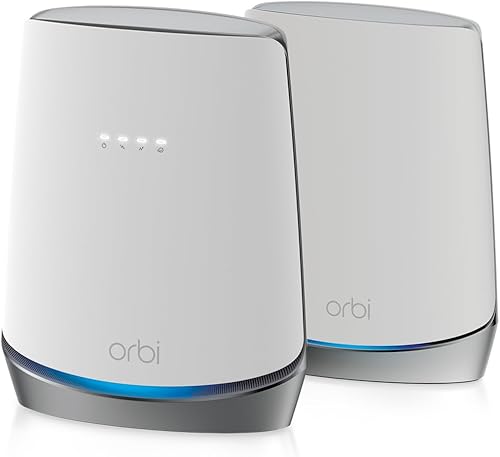
- DOCSIS 3.1 modem with mesh satellite
- Tri-band Wi-Fi 6 AX4200
- Up to 5,000 sq ft coverage
- Cox plans up to 1 Gbps
The included satellite extends the system beyond a single router, and NETGEAR lists Cox plan support up to 1 Gbps. It needs ISP activation after setup and does not support bundled voice plans.
Pros
- Router and mesh satellite included
- Coverage stated up to 5,000 sq ft
- Wired ports on router and satellite
Cons
- Cox support listed up to 1 Gbps
- Not compatible with bundled voice plans
The Orbi CBK752 is the mesh choice because it combines a DOCSIS 3.1 modem, Wi-Fi 6 router and satellite. NETGEAR states coverage up to 5,000 sq ft, with four Gigabit Ethernet ports on the router and two on the satellite.
NETGEAR lists Cox plan support up to 1 Gbps and says ISP activation is required after setup. The system does not support bundled voice plans, so check your Cox account details if you use a home phone package.
The router and satellite use tri-band AX4200 Wi-Fi 6. The satellite can help extend the network into rooms farther from the router, but placement and building materials still affect coverage.
Choose Orbi if you want a mesh system and your Cox plan falls within its stated limit. For a higher Cox speed tier, compare models with plan support that better matches your service.
ARRIS Surfboard G20: Best for Cox plans up to 1 Gbps

- DOCSIS 3.1
- Dual-band Wi-Fi 6 AX3000
- Two Gigabit Ethernet ports
- Coverage up to 2,500 sq ft
The G20 is a simpler all-in-one choice for a Cox plan up to 1 Gbps, with Wi-Fi 6 and two wired ports. Check Cox's current model list before activation.
Pros
- DOCSIS 3.1
- Wi-Fi 6
- Two Gigabit ports
Cons
- Only two Ethernet ports
- Confirm Cox model support
The G20 is a compact feature set for a Cox plan up to 1 Gbps, with DOCSIS 3.1 and dual-band AX3000 Wi-Fi 6. It has two Gigabit Ethernet ports, so count your wired devices before choosing it.
ARRIS says the G20 works with Cox and supports gig-speed cable plans. Its stated coverage is up to 2,500 sq ft, but actual Wi-Fi reach varies with home construction and router placement.
This model keeps the modem and router together without adding a mesh satellite. Check the Cox list for current approval and ask whether the G20 is supported for your plan.
Pick it if two wired ports are enough and your Cox plan fits the stated speed range. If you need more wired connections, consider the G34 or G18.
Motorola MG8702: Best for app controls

- DOCSIS 3.1
- AC3200 Wi-Fi router
- Four Gigabit Ethernet ports
- Mobile app for setup and network controls
Motorola pairs a DOCSIS 3.1 modem with an AC3200 router and an app for setup, guest networks and speed tests. Its stated provider compatibility includes Cox, but verify your plan before buying.
Pros
- Four Gigabit Ethernet ports
- App includes network management tools
- DOCSIS 3.1
Cons
- Wi-Fi 5 rather than Wi-Fi 6
- Confirm plan compatibility with Cox
The MG8702 pairs a DOCSIS 3.1 modem with an AC3200 Wi-Fi router and four Gigabit Ethernet ports. Motorola lists Cox among its compatible providers and includes an app for setup, guest network management, usage monitoring and speed tests.
The wireless system is AC3200 rather than Wi-Fi 6, so compare it with the ARRIS Wi-Fi 6 options if your home has newer wireless devices. Motorola also describes Power Boost, Range Boost and AnyBeam beamforming as part of its router features.
Motorola states a 2-year manufacturer warranty and offers 2 years of free expert support. Confirm Cox compatibility for your exact plan before buying, since general provider support may not cover every service tier.
Choose the MG8702 if you value app controls and four wired ports. For Wi-Fi 6, compare the G34, G20 or G18 instead.
ARRIS Surfboard G18: Best for basic Wi-Fi 6
- DOCSIS 3.1
- Dual-band Wi-Fi 6 AX1800
- Four Ethernet ports
- Supports gig-speed cable plans
The G18 combines a DOCSIS 3.1 cable modem with Wi-Fi 6 and four Ethernet ports. ARRIS says it works with Cox, but confirm current approval and plan support.
Pros
- DOCSIS 3.1
- Wi-Fi 6
- Four Ethernet ports
Cons
- Confirm Cox support for your plan
- Coverage details aren't specified
The G18 is a basic Wi-Fi 6 option with a DOCSIS 3.1 modem and four Ethernet ports. ARRIS says it works with Cox and supports gig-speed cable plans, but Cox should confirm approval for your plan.
Its dual-band AX1800 Wi-Fi 6 is a lower stated wireless tier than the AX3000 G34 and G20. The available product details don't specify its coverage area, so use a mesh system or separate access point if your home layout needs more reach.
The G18 may fit a smaller setup where four wired ports and Wi-Fi 6 matter more than a high plan ceiling or mesh features. Check your plan speed and the current Cox device list before activation.
How to choose a Cox modem router combo
Choose a combo by checking Cox approval first, then matching the modem's stated plan support to your subscribed speed. After that, compare Wi-Fi coverage, ports and any voice service requirements.
What Cox compatibility should you confirm?
Cox's approval can depend on the modem model and your plan. Use the Cox approved modem list as your starting point, then confirm the exact model with Cox before ordering.
A general statement that a device works with Cox does not guarantee that Cox will activate it for every account. Ask about plan support and bundled voice compatibility if you use Cox phone service.
How much speed support do you need?
The modem should support at least the plan speed you pay for, with some room if you expect to upgrade. For example, NETGEAR lists the Orbi CBK752 for Cox plans up to 1 Gbps, while ARRIS gives higher plan ceilings for the G34, G36 and G54.
Your internet plan sets the service speed available to the home. A higher-capacity modem does not raise that plan speed on its own, and Wi-Fi speeds also depend on the router, device and environment.
Should you choose mesh Wi-Fi or one router?
A single combo is simpler and can work well when you can place it near the center of your home. The Orbi CBK752 adds a satellite and is the only mesh system in this roundup.
Coverage figures are estimates from manufacturers, not a guarantee for every room. Thick walls, multiple floors and the location of the modem can change results, so consider mesh when a single router cannot reach the areas you use.
Which ports and Wi-Fi features matter?
Count the wired devices you want to connect directly, then check whether you need a faster-than-Gigabit port. The G34 has four Gigabit ports, while the G36 adds 2.5 GbE and the G54 has a 10 GbE port.
Wi-Fi 6 is available on the G34, G36, G20, Orbi and G18. The G54 moves to Wi-Fi 7, while the MG8702 uses AC3200 Wi-Fi.
Cox modem router combo setup and alternatives
After Cox confirms compatibility, connect the coax cable and power, then follow the activation steps Cox provides. The G34's setup instructions describe connecting the cable and power before activating with the provider.
If you already own a separate modem and router, you may not need a combo. Our best cable modem router combos guide explains the broader tradeoffs, and what a modem router combo is covers the basic terms.
For a modem-only device, see our best modems for Cox guide. It can help if you want to choose your Wi-Fi router separately.
Which Cox modem router combo should you choose?
Choose the G34 for an all-around Wi-Fi 6 gateway with four Gigabit ports, the Orbi CBK752 for mesh coverage on a Cox plan up to 1 Gbps, or the G54 if Wi-Fi 7 and 10 GbE fit your network. Before buying, verify the exact model with Cox and match it to your plan.
For provider-specific approval details, start with the Cox approved modem list. If you decide a separate modem is a better fit, compare it with our Cox modem recommendations.
Our top 3 picks at a glance
-
1
-
2
-
3
Frequently asked questions
Can you use your own modem router combo with Cox?
Yes, if Cox supports the exact model for your plan and location. Check the Cox approved modem list before buying, then ask Cox whether the modem can be activated on your account.
A brand's general compatibility statement does not confirm every plan or account.
What should you check before choosing a Cox modem router combo?
Match the modem to your Cox plan and check whether your account uses bundled voice service. Then compare Wi-Fi coverage, Ethernet ports and the plan speed ceiling stated for the model.
For more on modem requirements, see our guide to the best modems for Cox.
Is a modem router combo the same as a gateway?
Yes. A cable modem router combo, often called a gateway, combines the cable modem and Wi-Fi router in one device.
That can reduce the number of boxes and cables, but separate devices may offer more flexibility if you want to upgrade the router later.
Does a Cox modem router combo include Wi-Fi?
Yes, each combo here includes a router for Wi-Fi, though the Wi-Fi generation, coverage claims and wired ports vary. Compare those details with your home size and the devices you plan to connect.
If a single unit cannot cover your layout, the Orbi CBK752 includes a mesh satellite.