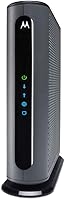
ARRIS SURFboard SBG10 Review: Worth It? (November 2026)
The ARRIS SURFboard SBG10 is a solid buy if your cable plan sits at or under 400 Mbps and you want one device for modem and Wi-Fi. Skip it for gigabit plans or large homes, where a DOCSIS 3.1 combo does the job better.
On this page (8 sections)
The ARRIS SURFboard SBG10 is a smart buy for a small home on a modest cable plan, because it puts a DOCSIS 3.0 modem and an AC1600 Wi-Fi router in one box. It's rated for internet speeds up to 400 Mbps and covers up to 1,400 sq ft.
This arris sbg10 review covers what the combo does well, where it falls short and which buyers should spend more. The short version: pick it if your plan tops out at 400 Mbps and you want to stop paying modem rental fees.
Look elsewhere for gigabit speeds or a big house.
The ARRIS SURFboard SBG10 at a glance
The SBG10 is a two-in-one modem and router for everyday cable internet. ARRIS builds it for households that want one tidy device, simple app setup and an end to rental fees, not for people chasing the fastest plan on the street.
ARRIS SURFboard SBG10: Best for budget cable plans

- DOCSIS 3.0, 16 x 4 channels
- AC1600 dual-band Wi-Fi
- Up to 400 Mbps internet speeds
- Up to 1,400 sq ft coverage
A two-in-one modem and router for modest cable plans. It saves the monthly rental fee and keeps the setup simple through the SURFboard Central app.
Pros
- One device replaces a separate modem and router
- Own it and cut the rental fee
- App setup with parental controls
- Covers up to 1,400 sq ft
Cons
- DOCSIS 3.0 tops out at 400 Mbps
- AC1600 Wi-Fi is a step behind Wi-Fi 6
Our score weighs specs, features and buyer feedback against what you're shopping for. For a 400 Mbps cable plan in a smaller home, the SBG10 hits nearly every mark.
Its two weak spots are the DOCSIS 3.0 ceiling and the older Wi-Fi 5 standard.
The name behind the box is worth noting. ARRIS says it has sold more than 260 million modems and invented the first cable modem gateway, and it also supplies the equipment many cable providers hand out.
That matters when you buy your own modem, because the provider already knows the hardware. The SBG10 carries a 2-year warranty card in the box, which is longer cover than many budget modems offer.
In the box you get the modem itself, the power supply and a quick-start guide. The app does the rest.
When the SBG10 makes sense
Buy it if you pay a monthly modem rental fee and your cable plan sits at or under 400 Mbps. A one-time purchase replaces the rented box and usually pays for itself within a year.
Skip it if you already have gigabit service or plan to upgrade soon. DOCSIS 3.0 can't deliver those speeds, so the modem would become the bottleneck in your network.
Who should buy the ARRIS SBG10?
The SBG10 fits small and medium homes on starter or mid-tier cable plans. Think apartments, condos and smaller houses where a few people stream, browse and work from home on plans in the 100 to 400 Mbps range.
It also suits renters and first-time modem buyers who want one device and one app rather than a modem plus a separate router. The SURFboard Central app walks you through activation and Wi-Fi setup step by step.
Skip it for a household with a gigabit plan, several 4K streams running at once and dozens of connected devices. A Wi-Fi 6 combo with DOCSIS 3.1 handles that load better and won't need replacing when your provider raises speeds.
If you already know you want to stay in the ARRIS family, the ARRIS Surfboard S33 review covers the faster DOCSIS 3.1 route. Our roundup of the best ARRIS Surfboard modem options puts the whole lineup side by side.
The rental math in practice
The savings claim is the whole reason many people buy their own modem. ARRIS puts the figure at up to 168 dollars per year in rental fees.
That number varies by provider, so check the modem line on your bill before you order.
If your provider charges roughly 14 dollars a month, the SBG10 pays for itself within the first year. After that, the same money stays in your pocket every month.
Factor in a router you no longer need to buy, and the case for owning gets a little stronger.
Specs that matter in daily use
The 400 Mbps speed rating and 1,400 sq ft coverage are the two numbers that shape daily life with the SBG10. The rest of the spec sheet supports those limits rather than extending them.
| Detail | ARRIS SURFboard SBG10 |
|---|---|
| Modem standard | DOCSIS 3.0, 16 x 4 channels |
| Wi-Fi | Dual-band AC1600 |
| Max internet speed | 400 Mbps |
| Coverage | Up to 1,400 sq ft |
| Ethernet ports | 4 Gigabit LAN ports |
| Setup | SURFboard Central app |
| Size (W x H x D) | 6.77 x 6.58 x 1.97 in |
| Weight | 2 lb |
| Warranty | 2-year warranty card included |
The 16 x 4 channel setup is the modem's data lanes. Sixteen downstream channels pull data in and four upstream channels send it out, which is enough bonding for a 400 Mbps plan.
The upstream side matters more than people expect. ARRIS rates the SBG10 for up to 131 Mbps upstream, so video calls and uploads have room on a typical cable plan.
A DOCSIS 3.1 modem bonds far more channels, which is why it supports gigabit speeds.
The Wi-Fi side is dual-band, so it runs a 2.4 GHz network for range and a 5 GHz network for speed. Most phones and laptops will lean on the 5 GHz band when they're close to the device, and fall back to 2.4 GHz across the house.
The total Wi-Fi throughput is rated at 1600 Mbps, split between the two bands. The 5 GHz band is where the faster figure sits.
The four Gigabit LAN ports let you hardwire a desktop, a gaming console or a streaming box. Wired connections stay steadier than Wi-Fi for anything that needs low latency, so use them where you can.
ARRIS lists personal computers, smart TVs and smartphones among the compatible devices, which covers the usual household mix.
The 2 lb weight and slim 6.77 inch footprint mean it sits on a shelf without much fuss. Its internal antennas keep the case clean and easy to place.
The case is black and about the size of a thick paperback standing on end.
How do you set up the ARRIS SBG10?
Setup takes three steps: connect the coax, activate with your provider and set up Wi-Fi in the app. ARRIS designed the SBG10 to be a plug-in job rather than a networking project.
Start by screwing the coax cable onto the modem's input and plugging in the power supply. Download the free SURFboard Central app on your phone and follow the prompts.
The app handles activation with your cable provider, then lets you name your Wi-Fi network, set the password and connect devices. Once you're online, it shows the devices on your network and offers parental controls like time limits and pausing internet.
Confirm your provider is on ARRIS's supported list before you order. The SBG10 is certified for most U.S. cable internet providers, and activation itself is typically quick.
If you're moving from a rented modem, return the old unit after activation to stop the rental charge. Keep the SBG10's receipt and warranty card, since ARRIS includes a 2-year warranty card in the box.
Day-to-day care and parental controls
Keep the SBG10 ventilated and use the app to manage the network rather than leaving it to run unmanaged. A few simple habits keep it stable and useful for the whole household.
Place it on a hard surface in the open, away from heat sources and crowded shelves. The internal antennas need air around the case, so don't bury it behind a TV or in a closed cabinet.
Central spots in the home help the 1,400 sq ft coverage claim hold up better than a corner placement.
Use the app's parental controls to set time limits and pause internet for selected devices. That's handy for homework hours or bedtime, and you can change the rules without touching the modem.
The same app gives you real-time monitoring of what's connected, so you can spot a device you don't recognize.
Restart the modem occasionally if speeds dip or a device won't connect. Unplug it for about 30 seconds, plug it back in and let it reconnect.
That clears most temporary glitches. If a single device is the problem, try reconnecting it before you touch the modem.
Wipe the case with a dry cloth when it gathers dust. Avoid liquids near the vents, and keep the power supply clear so it doesn't overheat.
The case runs warm in normal use, which is expected for a modem and router in one shell.
The trade-offs to weigh before you buy
The DOCSIS 3.0 ceiling is the biggest trade-off on the SBG10. It's rated for 400 Mbps, so a gigabit plan would be capped well below what you pay for.
Wi-Fi 5 (AC1600) is the second limit. Newer Wi-Fi 6 combos handle more devices at once and keep speeds steadier when the whole family is online.
If your home is packed with gadgets, the SBG10 can start to feel stretched. Wi-Fi 6 also handles congested neighborhoods better, where many nearby networks compete for the same airwaves.
The 1,400 sq ft coverage figure is a guide, not a guarantee. Walls, floors and device placement all cut into real-world range.
A large or multi-story home may want a combo with more coverage or a separate mesh system. The internal antennas keep the design clean, but they also mean you can't aim the signal toward a weak spot the way you can with external antennas.
One more point for renters and frequent movers: the SBG10 is tied to your provider's network. If you move to an area served by a different cable company, check the new provider's approved modem list before you pack it.
Most major U.S. cable providers accept it, but the list is not universal.
None of these are flaws in the SBG10 itself. They're the reasons its price sits below the DOCSIS 3.1 combos, and for the right plan they don't matter at all.
Alternatives to the ARRIS SBG10
Three options cover the main reasons to look past the SBG10: faster cable plans, more Wi-Fi range and a different feature mix. Each one fits a specific buyer better than the others.
NETGEAR Nighthawk CAX30
The NETGEAR Nighthawk CAX30 is the pick for gigabit cable plans, because it pairs a DOCSIS 3.1 modem with Wi-Fi 6. It supports plans up to 800 Mbps on Xfinity and up to 1 Gbps on Spectrum and Cox, with AX2700 Wi-Fi covering up to 2,000 sq ft.
It also brings four Gigabit Ethernet ports and WPA3 encryption. The catch is compatibility: it doesn't work with Verizon, AT&T, CenturyLink, DirecTV, DISH or bundled voice plans.
Our NETGEAR CAX30 vs ARRIS G34 comparison covers how the CAX30 stacks up against another popular combo.
NETGEAR Nighthawk CAX30S
The CAX30S is the CAX30's sibling with a longer Armor trial, and it lands on the same core specs. It's a DOCSIS 3.1 combo with AX2700 Wi-Fi 6, up to 2,000 sq ft coverage and support for plans up to 800 Mbps on Xfinity and up to 1 Gbps on Spectrum and Cox.
The difference that matters is the security trial. NETGEAR includes Armor for 90 days instead of 30, so you get more time with the added protection before deciding whether to subscribe.
Both NETGEAR models share the same provider limits and the same four Gigabit ports.
ARRIS Surfboard S34
The ARRIS Surfboard S34 is worth a look if you want to stay with ARRIS but move up to DOCSIS 3.1. It's the natural step up from the SBG10 within the same brand family.
Read the ARRIS Surfboard S34 reviews for the full picture on that model. If the S34's price feels high, the SBG10 remains the cheaper way to own an ARRIS modem on a modest plan.
Verdict: is the ARRIS SBG10 worth it?
The ARRIS SBG10 is worth buying for a small home on a cable plan of 400 Mbps or less. It does the modem and router job in one device, sets up through a simple app and ends the monthly rental fee.
For that buyer, this arris sbg10 review finds little to argue with.
Buy it if you want one device, simple setup and savings on your cable bill. Skip it if you have gigabit service or a busy, device-heavy home, and spend the difference on a DOCSIS 3.1 combo with Wi-Fi 6 instead.
The NETGEAR Nighthawk CAX30 is the stronger pick once your plan goes past 400 Mbps.
Before you order, check two things: your provider's supported modem list and your actual plan speed. Those two facts decide whether the SBG10 fits your home or becomes a bottleneck.
If ARRIS is the brand for you, start with our ARRIS Surfboard modem roundup and work down from there.
Frequently asked questions
What internet speed does the ARRIS SBG10 support?
The SBG10 is rated for internet speeds up to 400 Mbps. That covers common starter and mid-tier cable plans, but it leaves no room for a gigabit plan.
Check your plan's speed before you buy, because a faster plan needs a DOCSIS 3.1 modem.
Is the ARRIS SBG10 a modem and a router?
Yes, it's a two-in-one device. The cable modem and the AC1600 Wi-Fi router sit in one case, so you connect the coax cable and set up Wi-Fi in a single step.
You don't need a separate router unless you want to add one for more coverage.
How many devices can the ARRIS SBG10 handle?
ARRIS doesn't publish a device count for the SBG10. Its dual-band AC1600 Wi-Fi and 1,400 sq ft coverage suit a small to medium home with phones, laptops, a smart TV and a few smart home gadgets.
A busy household with many devices should look at a Wi-Fi 6 combo.
Do I need to activate the ARRIS SBG10 with my cable provider?
Yes. You buy the modem, then call or use your provider's app to activate it on your account.
The SBG10 is certified for most U.S. cable internet providers, but confirm yours is on the supported list before ordering.
Activation is usually free.
Does the ARRIS SBG10 replace the modem rental fee?
It can. Owning your modem means you stop paying the monthly rental charge, and ARRIS puts the savings at up to 168 dollars a year.
The exact figure depends on what your provider charges.
Check your bill to see the real amount.
Is the ARRIS SBG10 good for gaming?
It's fine for casual gaming on a 400 Mbps plan, and its four Gigabit Ethernet ports let you hardwire a console or PC for a steadier connection. Competitive gamers on faster plans should pick a DOCSIS 3.1 combo with Wi-Fi 6 for lower latency.