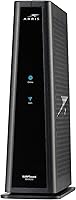
How to Set Up an ARRIS Surfboard G34
Connect the coax cable to the wall outlet and the G34, plug in the power, then activate the modem with your cable provider. After activation, join the default Wi-Fi network or set your own name and password.
On this page (8 sections)
- What comes in the ARRIS Surfboard G34 box?
- How do you connect the ARRIS Surfboard G34 to your cable outlet?
- How do you activate the G34 with your cable provider?
- How do you get onto the G34's Wi-Fi network?
- How do you connect wired devices to the G34?
- What should you know before buying the ARRIS Surfboard G34?
- What should you do if the G34 won't get online?
- How to set up ARRIS Surfboard G34: the short version
Here's how to set up an ARRIS Surfboard G34: screw the coax cable onto the wall outlet and the modem, connect the power supply, and activate the modem with your cable provider. Then join the default Wi-Fi network or set your own name and password.
The G34 is a cable modem and Wi-Fi 6 router in one unit, so one box replaces both your rented modem and your router. That keeps the process short: cable in, power on, activation, Wi-Fi.
Below is the order that works, plus the wiring and network settings worth checking before you move on.
What comes in the ARRIS Surfboard G34 box?
The box holds the G34 modem router, a power supply, a Quick Start Guide, and a warranty card. You supply the coax cable and any Ethernet cables you need for wired devices.
The modem measures 10 x 3 x 8 inches and weighs 2 pounds, so it fits on a shelf or the floor without much room. LED indicators on the front show power, upstream and downstream status, and whether the modem is online.
The antennas are built into the body, which is part of why the case stays this small. There are no external paddles to aim or snap on, so placement is about giving the unit a little open space rather than pointing anything.
Before you start, check that your provider supports the G34. ARRIS says all SURFboard modems are CableLabs certified and the G34 is tested and qualified for Xfinity, Cox, and Spectrum.
Confirm the model on your provider's approved list so activation goes smoothly.
How do you connect the ARRIS Surfboard G34 to your cable outlet?
Run a coax cable from a live wall outlet to the threaded connector on the back of the G34, then attach the power supply. Hand-tighten the coax so it doesn't work loose.
If your outlet is far from where the modem will sit, a longer coax run fixes that. The GE cable is a 6 ft RG6 option with F-type connectors that screw on without tools.
The quad shielding helps block interference and the cable is rated for in-wall use, so a short run behind furniture is fine. Its solid core conductor and 3 GHz rating carry the digital signal.
The gold-plated compression connectors resist corrosion and screw straight onto the F-type jacks, so no tools are needed for the wall plate or the modem end.
Avoid daisy-chaining splitters you don't need, since extra splits weaken the signal. If a splitter is already feeding a TV, keep the modem on the shortest, least-split branch you can.
Once both connections are snug, plug the power supply into a wall outlet. The G34 needs a moment to lock onto the downstream and upstream channels before the online light comes on.
The upstream and downstream LEDs tell you whether it has found those channels, and the online light confirms it has finished. If the downstream light never comes on, the outlet or the coax run is the first thing to check.
How do you activate the G34 with your cable provider?
Activation happens on your provider's side, not in the box. Once the modem's online light is steady, call your provider or use its activation page and give the G34's model and MAC address so it can be provisioned on your account.
The MAC address is printed on the modem label. Some providers walk you through activation in a phone call and push the settings remotely; others let you type the address into a web form.
Either way, keep the modem powered on and connected during activation.
Have your account number and the plan name handy. It also helps to know your plan's speed tier, since the G34 is rated for cable plans up to 2.5 Gbps under DOCSIS 3.1 and its maximum upstream rate is 450 Mbps.
If the modem's online light stays off after activation, check the coax connection and the wall outlet first, then call back and ask the provider to confirm the G34 is on the approved list for your plan.
How do you get onto the G34's Wi-Fi network?
Join the default Wi-Fi network printed on the modem label, then change the network name and password to your own. The G34 broadcasts dual-band Wi-Fi 6 (AX3000) and ARRIS rates it for coverage up to 2,500 square feet.
Changing the defaults is the step most people skip. The default password is often a shared pattern, so a new name and password keep neighbors and visitors off your network.
Use the ARRIS SURFboard app or the modem's admin page to make the change. The app is the control method ARRIS lists for the G34, so you can manage the network from your phone rather than hunting for a browser window.
What should you set in the Wi-Fi settings?
Give the 5 GHz band a clear name and keep the 2.4 GHz band available for older gear like smart plugs and cameras. The dual-band radio runs both, and devices pick the band they support.
Set one strong password you'll remember, and skip hiding the network name, since that causes more connection trouble than it prevents.
If you need more detail on the web admin, our walkthrough of how to set up an ARRIS modem router covers the login and wireless settings screens.
How do you connect wired devices to the G34?
Use any of the four 1 Gigabit Ethernet ports on the back for a wired connection. Each port runs at 1 Gbps, which suits a desktop, console, or streaming box.
The Jadaol cable is a 50 ft flat Cat 6 patch cable that can run along a wall or under a carpet when the device sits in another room.
Plug one end into a LAN port and the other into the device's network port. The flat shape helps when you're routing behind baseboards.
The cable is rated to 250 MHz and 10 Gbps and built from 100% bare copper wire, so it clears the G34's 1 Gbps port ceiling with room to spare. Wired devices skip Wi-Fi congestion and usually get steadier speeds than wireless ones in the same room.
Where should the G34 sit for the best Wi-Fi?
Put the G34 out in the open rather than in a closet or cabinet. Wi-Fi 6 coverage up to 2,500 square feet assumes a fairly central spot, so a shelf near the middle of the home beats a corner in the basement.
Keep it away from metal shelves and thick walls, and give the internal antennas some breathing room.
What should you know before buying the ARRIS Surfboard G34?
The G34 suits cable households that want to stop paying modem rental fees and get Wi-Fi 6 in one box. ARRIS says owning the modem saves the monthly equipment charge, and the combo means one device to power and manage.
It's not a fit for every connection, though. ARRIS states SURFboard modems are not compatible with fiber, DSL, or satellite services, so only buy it for a cable plan.
Check your provider's approved model list before ordering.
The Wi-Fi 6 radio covers up to 2,500 square feet according to ARRIS, which suits most apartments and single-family homes. Very large homes or thick walls may need a separate mesh node.
The four Gigabit ports are enough for a desk, a console, and a couple of smart-home hubs without adding a switch.
If you want to compare it with a rival combo unit, our NETGEAR CAX30 vs ARRIS G34 breakdown lines up the specs. For a modem-only option from the same brand, the ARRIS Surfboard S33 review covers a DOCSIS 3.1 modem without Wi-Fi.
And if you're still choosing a model, our roundup of the best ARRIS Surfboard modem picks covers the range.
What should you do if the G34 won't get online?
Check the coax first, then the power, then activation. Most no-internet problems trace back to one of those three, not to the modem itself.
Make sure the coax is screwed tight at both ends and the wall outlet is active. Confirm the power supply is fully seated in the modem and the outlet.
If both look right and the online light is still off, the modem likely hasn't finished activation. Read the LEDs in order: no downstream light points to the cable or outlet, a downstream light with no upstream light points to the provider side.
Once activation is confirmed and the online light is steady but Wi-Fi devices still can't browse, power-cycle the G34 and reconnect one device. A simple restart clears most setup hiccups, and it's the step provider support will ask you to try first.
If a wired device on a LAN port works while Wi-Fi doesn't, the problem is in the wireless settings rather than the internet connection.
How to set up ARRIS Surfboard G34: the short version
Setting up the ARRIS Surfboard G34 comes down to coax in, power on, activate with your provider, then set your Wi-Fi name and password. Do those in order and the modem handles the rest.
Pick the G34 if you have a cable plan up to 2.5 Gbps and want Wi-Fi 6 without a separate router. Add a longer Cat 6 cable for a wired device in another room.
Skip it if your home runs on fiber or DSL, since ARRIS says it isn't built for those services.
Keep the coax run short and the splitter count low, then confirm your provider lists the model before you order. That small check is what makes the rest of the setup quick.
Frequently asked questions
Do I need to call my cable provider to set up the G34?
Yes. The G34 needs to be activated on your cable account before it will get online.
Connect the coax and power first, then contact your provider with the modem model and its MAC address, or use its self-activation page if it offers one.
Can I use the ARRIS Surfboard G34 with fiber or DSL internet?
No. The G34 is a cable modem, and ARRIS says SURFboard modems are not compatible with fiber, DSL, or satellite services.
It works on cable networks such as Xfinity, Cox, and Spectrum, and you should confirm your plan supports the model before you buy.
How fast an internet plan does the G34 support?
ARRIS rates the G34 for cable plans up to 2.5 Gbps under DOCSIS 3.1. Its four Ethernet ports each run at 1 Gigabit, so a single wired device tops out at 1 Gbps even on a faster plan.
How do I change the Wi-Fi name and password on the G34?
Open the ARRIS SURFboard app or the modem's web admin page and sign in with the admin credentials. Find the wireless settings, then rename the network and set a new password.
Reconnect your devices to the new network afterward.
Why does my G34 show an online light but no internet?
The modem is reaching the cable network but hasn't finished activation on your account. Call your provider and confirm the G34 is provisioned for your plan.
If activation is complete, power-cycle the modem and check the coax connection.